
Skip to content
No results
Purple hexagonal logo with white diamond-shaped center featuring geometric star pattern design suitable for corporate branding and digital applications
LIPS®Developer
Documentation
Back To LIPS
Purple hexagonal logo with white diamond-shaped center featuring geometric star pattern design suitable for corporate branding and digital applications
LIPS®Developer
Documentation
Back To LIPS

Quick Introduction

7
  • LIPS® Documentation Overview
  • 3D Depth Camera Tech Overview
  • Depth Image
  • Understanding Depth
  • An Ideal Depth Camera
  • LIPSedge™ AE Series Camera Selection Guide
  • Frequently Asked Questions

LIPSedge Documents

49
  • LIPSedge™ AE400 / AE450
    • LIPSedge™ AE400 / AE450 Complementary Documents
      • Certifications Documents
      • STEP files for CAD Use
      • Firmware
    • LIPSedge™ AE400 / AE450 User Guide
      • LIPSedge™ AE400 / AE450
      • User Guide
      • Previous Releases (Archive)
    • LIPSedge™ AE400 / AE450 SDK Release
      • SDK Release
      • Previous Releases (Archive)
    • LIPSedge™ AE400 / AE450 Installation
      • Installation
      • Linux
      • Windows
      • ROS Wrapper
      • NVIDIA ISAAC Wrapper
      • Persistent Connection
  • LIPSedge™ AE430 / AE470
    • LIPSedge™ AE430 / AE470 Supplementary Documents
      • Firmware
      • STEP files for CAD Use
    • LIPSedge™ AE430 / AE470 User Guide
      • LIPSedge™ AE430 / AE470
      • User Guide
      • Previous Releases (Archive)
    • LIPSedge™ AE430 / AE470 SDK Release
      • SDK Release
      • Previous Releases (Archive)
  • LIPSedge™ DL & M3 Series
    • LIPSedge™ DL & M3 Series Installation
      • Installation
      • Ubuntu
      • Windows
    • LIPSedge™ DL & M3 Supplementary Documents
      • STEP files for CAD Use
    • LIPSedge™ DL & M3 Series SDK Release
      • SDK Release
      • Changelog
      • Previous Releases (Archive)
    • LIPSedge™ DL & M3 Series User Guide
      • LIPSedge™ DL & M3 Series
      • User Guide
      • Previous Releases (Archive)
  • LIPSedge™ L215u / L210u
    • LIPSedge™ L215u / L210u User Guide
      • LIPSedge™ L215u / L210u
      • User Guide
      • Previous Releases (Archive)
    • LIPSedge™ L215u / L210u SDK Release
      • SDK Release
      • Changelog
      • Previous Releases (Archive)
    • LIPSedge™ L215u / L210u Installation
      • Installation
      • Linux
      • Windows
    • LIPSedge™ L215u / L210u Supplementary Documents
      • STEP files for CAD Use
  • LIPSedge™ L235
    •  LIPSedge™ L235 User’s Manual
    • LIPSedge™ L235 SDK Release
  • LIPSedge™ S Series
    • LIPSedge™ S Series User Guide
      •  LIPSedge™ S Series
      • User Guide
    • LIPSedge™ S Series SDK Release
      • SDK Release
    • LIPSedge™ S Series Installation
      • Windows
  • LIPSedge™ AE430-DK / AE470-DK
    • LIPSedge™ AE430-DK / AE470-DK
    • User Guide

LIPSedge™ SDK 1.x

72
  • Introduction to LIPSedge™ SDK 1.x
    • LIPSedge™ SDK 1.x
    • Benefits from LIPSedge™ SDK implementation
    • LIPSedge™ SDK 1.x Installation Architecture
    • How to identify each camera SDK
  • Tutorial and deployment
    • Tutorials
    • Development and Deployment on arm64
  • Features Articles
    • Features Articles
    • LIPSedge™ SDK Persistent Connection for PoE and USB
  • LIPSedge™ SDK Frameworks
    • LIPSedge™ SDK Frameworks
    • ROS
    • ROS2
    • NVIDIA Isaac Wrapper
    • GenICam (for Halcon / Aurora Vision)
      • GenICam (for Halcon / Aurora Vision)
      • User Manual
      • Driver(.cti) and Nodemap (.xml)
      • Supported LIPSedge™ Camera SDK
      • Installation Example
  • LIPSedge™ SDK Tools
    • LIPSedge™ SDK Tools
    • DepthViewer
    • PointCloudViewer
    • CameraParameterViewer
    • CameraCenterViewer
    • CameraEventListener
    • CameraPowerTest
    • LensModeSelector
    • LIPSImuReader
    • CameraSimpleViewer
    • RawFileViewer
  • LIPSedge™ SDK Languages & Libraries
    • LIPSedge™ SDK Languages & Libraries
    • OpenCV
    • C++
      • C++
      • environment-setup
      • hello-lipsedge-sdk
      • opencv-viewer
      • roi
      • depth-data
      • align-depth-color
      • range-filter
      • remove-background
      • record
      • pointcloud
      • config-resolution
      • camera-parameter
      • align
      • distance
      • grabcuts
      • measure
      • motion
      • post-processing
      • save-to-disk
      • sensor-control
    • Python
      • Python
      • environment-setup
      • hello-lipsedge-sdk
      • opencv-viewer
      • roi
      • depth-data
      • align-depth-color
      • range-filter
      • remove-background
      • record
    • Java
      • Java
      • ni-hello
    • C#
      • C#
      • ni-hello
      • simple-read
  • New Features for v1.1.1
    • New Features for v1.1.1
  • LIPSedge™ SDK Sample Codes
    • LIPSedge™ SDK Sample Codes
    • Sample Applications & Viewer & Utilities
      • Sample Applications & Viewer & Utilities
      • ni-viewer
      • ni-pointcloud-gl
      • ni-camera-matrix

LIPSense Documents

33
  • LIPSense™ 3D Body Pose Middleware
    • LIPSense™ 3D Body Pose SDK
    • User Manual & SDK Download
    • License Management
    • Changelog
    • Previous Releases (Archive)
    • Examples
      • Python
        • Python
        • python_example
      • c#
        • SkeletonCSharp
        • C#
      • C++
        • C++
        • skeleton_example
        • skeleton_opencv
  • LIPScan 3D ™ Middleware
    • LIPScan 3D ™ Middleware
    • LIPScan 3D™ Desktop
      • LIPScan 3D™ Desktop
      • User’s Manual
      • Application Download
      • Release Notes
      • Previous Releases
    • LIPScan 3D™ SDK
      • LIPScan 3D™ SDK
      • User’s Manual
      • SDK Download
      • Release Notes
      • Previous Releases
  • LIPSFace™ SDK
    • LIPSFace™ SDK
    • LIPSFace Overview
    • Changelog
  • LIPSFace™ HW120/125 On-Device 3D Facial Recognition
    • LIPSFace™ HW120/125 On-Device 3D Facial Recognition
    • User Guide
    • SDK Download
    • STEP files for CAD Use
  • LIPSFace™ HW110/115 On-Device 3D Facial Recognition
    • LIPSFace™ HW110/115 On-Device 3D Facial Recognition
    • User Guide & SDK Download
    • STEP files for CAD Use

LIPSolution Documents

3
  • LIPSAMR Perception Development Kit
    • LIPSAMR Perception Development Kit (PDK4)
      • Overview
      • Technical Specifications
      • NVBLOX Sample Build

LIPSMetric Documents

7
  • LIPSMetric™ VD115 Vehicle Dimensioner
    • LIPSMetric™ VD115 Vehicle Dimensioner
  • LIPSMetric™ ST115 Static Dimensioner
    • LIPSMetric™ ST115 Static Dimensioner
    • User’s Manual
  • LIPSMetric™ ST130 Pallet Dimensioner
    • LIPSMetric™ ST130 Pallet Dimensioner
    • User Guide
  • LIPSMetric™ HA110 Handheld Dimensioner
    • LIPSMetric™ HA110 Handheld Dimensioner
    • User’s Manual

LIPSMetric™ Measure Master

8
  • LIPSMetric™ ST110d
    • User’s Manual
    • SDK Release
  • LIPSMetric™ ST115b
    • User’s Manual
    • SDK Release
  • LIPSMetric™ HA110-M
    • User’s Manual
    • SDK Release
  • LIPSMetric™ HA115a
    • SDK Release
    • User’s Manual

Other LIPS Documents

1
  • LIPS License Management
    • LIPS License Management
View Categories
  • Home
  • LIPS® Developer Documentation
  • LIPSolution Documents
  • LIPSAMR Perception Development Kit
  • LIPSAMR Perception Development Kit (PDK4)
  • NVBLOX Sample Build

NVBLOX Sample Build

NVBLOX includes 3 different applications for scene reconstruction. For detailed information please refer to the Nvidia’s website: https://nvidia-isaacros.github.io/concepts/scene_reconstruction/nvblox/technical_details.html

The following graph illustrates the method for building the NVBLOX samples.
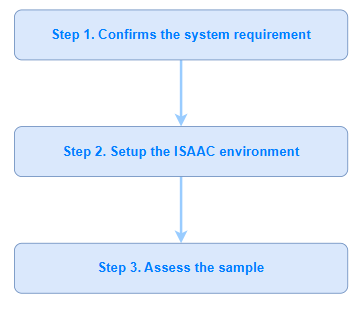
NVBLOX Build 1 1 | LIPS® Developer Documentation

Confirms the system requirement #

Please ensure your system is qualified to Nvidia’s recommendation.

  • Refer to NVIDIA ISAAC ROS Document: System Requirement
  • Supported ROS version: ROS Humble

Setup the ISAAC environment #

For LIPSAMR Perception Development Kit users, skip to Step. 6 directly.

1. Follow the NVIDIA tutorial to set up for computation.

2. Follow the NVIDIA tutorial to set up for development.

3. Download assets for NVBLOX:

  • Refer to the Quickstart Assets.
  • Make sure all the prerequisites are installed.
sudo apt-get install -y curl tar
  • Run the following commands to download the assets.
NGC_ORG="nvidia"
NGC_TEAM="isaac"
PACKAGE_NAME="isaac_ros_nvblox"
NGC_RESOURCE="isaac_ros_nvblox_assets"
NGC_FILENAME="quickstart.tar.gz"
MAJOR_VERSION=3
MINOR_VERSION=2
VERSION_REQ_URL="https://catalog.ngc.nvidia.com/api/resources/versions
?orgName=$NGC_ORG&teamName=$NGC_TEAM&name=$NGC_RESOUR
CE&isPublic=true&pageNumber=0&pageSize=100&sortOrder=CREATED_D
ATE_DESC"
AVAILABLE_VERSIONS=$(curl -s \
 -H "Accept: application/json" "$VERSION_REQ_URL")
LATEST_VERSION_ID=$(echo $AVAILABLE_VERSIONS | jq -r "
 .recipeVersions[]
 | .versionId as \$v
 | \$v | select(test(\"^\\\\d+\\\\.\\\\d+\\\\.\\\\d+$\"))
 | split(\".\") | {major: .[0]|tonumber, minor: .[1]|tonumber,
patch: .[2]|tonumber}
 | select(.major == $MAJOR_VERSION and .minor <= $MINOR_VERSION)
 | \$v
 " | sort -V | tail -n 1
)
if [ -z "$LATEST_VERSION_ID" ]; then
 echo "No corresponding version found for Isaac ROS
$MAJOR_VERSION.$MINOR_VERSION"
 echo "Found versions:"
 echo $AVAILABLE_VERSIONS | jq -r '.recipeVersions[].versionId'
else
 mkdir -p ${ISAAC_ROS_WS}/isaac_ros_assets && \

FILE_REQ_URL="https://api.ngc.nvidia.com/v2/resources/$NGC_ORG/$NGC
_TEAM/$NGC_RESOURCE/\
versions/$LATEST_VERSION_ID/files/$NGC_FILENAME" && \
 curl -LO --request GET "${FILE_REQ_URL}" && \
 tar -xf ${NGC_FILENAME} -C ${ISAAC_ROS_WS}/isaac_ros_assets && \
 rm ${NGC_FILENAME}
fi

4. Clone the following repositories:

  • realsense-ros
  • isaac_ros_common
  • isaac_ros_nvblox
cd ${ISAAC_ROS_WS}/src
git clone https://github.com/lips-hci/realsense-ros.git -b 4.51.1-lipsedge
git clone -b release-3.2 https://github.com/NVIDIA-ISAACROS/isaac_ros_common.git isaac_ros_common
git clone --recursive -b release-3.2 https://github.com/NVIDIA-ISAACROS/isaac_ros_nvblox.git isaac_ros_nvblox

5. Manually stop Git from tracking the COLCON_IGNORE file in the realsense_splitter package and remove the file. (Reference)

6. Launch the Docker container.

cd ${ISAAC_ROS_WS} && ./src/isaac_ros_common/scripts/run_dev.sh

7. Use rosdep to install the package’s dependencies.

sudo apt update
rosdep update
rosdep install -i -r --from-paths /workspaces/isaac_rosdev/src/isaac_ros_nvblox/ --rosdistro humble -y

Notes: Make sure the above command line should be keyed in the same row in the terminal as below

rosdep install -i -r --from-paths /workspaces/isaac_ros-dev/src/isaac_ros_nvblox/ --rosdistro humble -y

8. Install the LIPSedge™ SDK from LIPS Corp.’s website and place the SDK file to /workspaces/isaac_ros-dev

cd /workspaces/isaac_ros-dev
sudo dpkg -i librealsense2z-lipsedge_2.43.0-bionic~20240903.02986cce_arm64.deb

9. Build and source the ROS workspace.

cd /workspaces/isaac_ros-dev
colcon build --symlink-install --packages-up-to isaac_ros_nvblox
colcon build --symlink-install --packages-up-to-regex realsense*
source install/setup.bash

10. Download and install the PeopleSemNet model assets:

sudo apt-get update
sudo apt-get install -y ros-humble-isaac-ros-peoplesemseg-modelsinstall &&
ros2 run isaac_ros_peoplesemseg_models_install
install_peoplesemsegnet_vanilla.sh --eula &&
ros2 run isaac_ros_peoplesemseg_models_install
install_peoplesemsegnet_shuffleseg.sh --eula

11. For multiple camera setup:

  • Access the settings file with the command:
sudo vim /usr/local/bin/network.json
  • Press i
    • Count: The quantity of the camera. LIPS Corp. uses 4 as an example for 4 cameras.
    • IP: The corresponding IP address for each camera
  • Press ESC to modify the camera settings.
  • For saving the modified settings:
:wq

12. Turn on the cameras and confirm the serial number for each camera:

  • Make sure the camera serial numbers match the corresponding cameras.
ros2 launch nvblox_examples_bringup realsense.launch.py \
run_standalone:=True \
camera_serial_numbers:='211523062311,151223061441,1514222510
43,215122256933' \
container_name:='nvblox_container' \
num_cameras:=4
Assess the samples
  • Refer to the ISAAC ROS: Examples for Intel® RealSense™
  • Start a new Terminal to execute the samples below:
docker exec -it --user admin isaac_ros_dev-aarch64-container 
bash
source install/setup.bash
  • NVBLOX reconstruction example with LIPSedge™ (Static)
ros2 launch nvblox_examples_bringup realsense_example.launch.py \
num_cameras:=4 \
mode:=static attach_to_container:=True \
container_name:='nvblox_container' \
run_realsense:=False
  • NVBLOX reconstruction example with LIPSedge™
ros2 launch nvblox_examples_bringup realsense_example.launch.py \
mode:=dynamic \
num_cameras:=4 \
attach_to_container:=True \
container_name:='nvblox_container' \
run_realsense:=False
  • NVBLOX reconstruction example with LIPSedge™ (Full-segmentation models)
ros2 launch nvblox_examples_bringup realsense_example.launch.py \
mode:=people_segmentation \
num_cameras:=4 \
attach_to_container:=True \
container_name:='nvblox_container' \
run_realsense:=False
  • NVBLOX reconstruction example with LIPSedge™ (Light-segmentation models)
ros2 launch nvblox_examples_bringup realsense_example.launch.py \
mode:=people_segmentation \
people_segmentation:=peoplesemsegnet_shuffleseg \
num_cameras:=4 \
attach_to_container:=True \
container_name:='nvblox_container' \
run_realsense:=False
Updated on 2026 年 8 月 21 日
LIPSAMR
Technical SpecificationsOverview
Table of Contents
  • Confirms the system requirement
  • Setup the ISAAC environment

#LIPS

About Us

Store

Blog

Terms of Use

DEVELOPER

Technical Support

SDK Download

Code Samples

Github

Copyright © 2026 LIPS Corporation | Privacy Policy | Cookie Policy | Do Not Sell My Personal Information