
Overview #
This is a Python implementation of a Real-time 3D Body Pose Estimation application using LIPSBodyPose SDK(Pro Version). It captures data from LIPSedge cameras, processes it to find human skeletons, and visualizes the results using OpenCV.
Tutorial #
- First, the script imports the libraries, connect the DLLs and initializing the Pose Engine
import sys
import os
import json
import numpy as np
import cv2

if sys.platform == 'win32':
    LIPSBODYPOSE_SDK_ROOT = os.environ.get("LIPSBODYPOSE_SDK_ROOT")
    CUDA_PATH = os.environ.get("CUDA_PATH")
    os.add_dll_directory(LIPSBODYPOSE_SDK_ROOT+"bin")
    os.add_dll_directory(LIPSBODYPOSE_SDK_ROOT+"bin\\OpenNI2\\Drivers")
    os.add_dll_directory(LIPSBODYPOSE_SDK_ROOT+"3rdparty\\openvino\\bin")
    os.add_dll_directory(LIPSBODYPOSE_SDK_ROOT+"3rdparty\\zlib\\bin")
    os.add_dll_directory(CUDA_PATH+"\\bin")

import pylipsbodypose as pose2. The function convertInt converts 2D floating-point coordinates (decimals) into integer pixels to ensure coordinates are compatible with drawing functions.
def convertInt(point2d):
return (int(point2d[0]+0.5),
int(point2d[1]+0.5))3. Create the Skeleton Drawing Function to:
(1) Define Connections: Establish a map of joint pairs (connection_pairs) to connect keypoints for the face, body, and high-fidelity hand joints.
(2) Assign Unique Colors: Use the skeleton ID to select a specific color from the list, ensuring different people are easily distinguishable.
(3) Render Bones and Joints: Iterate through all valid keypoints to draw connection lines (bones) and solid circles (joints) onto the image.
(4) Display 3D Distance: Retrieve the depth (Z-axis) from the NECK position, convert it from millimeters to meters, and overlay the distance text on the BGR image.
def drawSkeletons(img, skeletons):
connection_pairs = [
# Face
('R_EYE', 'R_EAR'),
('L_EYE', 'L_EAR'),
('R_EYE', 'NOSE'),
('L_EYE', 'NOSE'),
('R_EYE', 'HEAD'),
('L_EYE', 'HEAD'),
# Body
('NOSE', 'NECK'),
('NECK', 'R_SHOULDER'),
('NECK', 'L_SHOULDER'),
('R_SHOULDER', 'R_HIP'),
('L_SHOULDER', 'L_HIP'),
('L_HIP', 'R_HIP'),
('NECK', 'CHEST_SPINE'),
('CHEST_SPINE', 'NAVEL_SPINE'),
('NAVEL_SPINE', 'PELVIS'),
# Right arm
('R_SHOULDER', 'R_ELBOW'),
('R_ELBOW', 'R_WRIST'),
('R_WRIST', 'R_HAND'),
('R_WRIST', 'R_THUMB_TIP'),
('R_HAND', 'R_HAND_TIP'),
# Left arm
('L_SHOULDER', 'L_ELBOW'),
('L_ELBOW', 'L_WRIST'),
('L_WRIST', 'L_HAND'),
('L_WRIST', 'L_THUMB_TIP'),
('L_HAND', 'L_HAND_TIP'),
# Right leg
('R_HIP', 'R_KNEE'),
('R_KNEE', 'R_ANKLE'),
('R_ANKLE', 'R_FOOT'),
# Left leg
('L_HIP', 'L_KNEE'),
('L_KNEE', 'L_ANKLE'),
('L_ANKLE', 'L_FOOT'),
# Right hand
('R_WRIST', 'HAND_R_THUMB_CMC'),
('HAND_R_THUMB_CMC', 'HAND_R_THUMB_MCP'),
('HAND_R_THUMB_MCP', 'HAND_R_THUMB_IP'),
('HAND_R_THUMB_IP', 'HAND_R_THUMB_TIP'),
('R_WRIST', 'HAND_R_INDEX_MCP'),
('HAND_R_INDEX_MCP', 'HAND_R_INDEX_PIP'),
('HAND_R_INDEX_PIP', 'HAND_R_INDEX_DIP'),
('HAND_R_INDEX_DIP', 'HAND_R_INDEX_TIP'),
('R_WRIST', 'HAND_R_MIDDLE_MCP'),
('HAND_R_MIDDLE_MCP', 'HAND_R_MIDDLE_PIP'),
('HAND_R_MIDDLE_PIP', 'HAND_R_MIDDLE_DIP'),
('HAND_R_MIDDLE_DIP', 'HAND_R_MIDDLE_TIP'),
('R_WRIST', 'HAND_R_RING_MCP'),
('HAND_R_RING_MCP', 'HAND_R_RING_PIP'),
('HAND_R_RING_PIP', 'HAND_R_RING_DIP'),
('HAND_R_RING_DIP', 'HAND_R_RING_TIP'),
('R_WRIST', 'HAND_R_LITTLE_MCP'),
('HAND_R_LITTLE_MCP', 'HAND_R_LITTLE_PIP'),
('HAND_R_LITTLE_PIP', 'HAND_R_LITTLE_DIP'),
('HAND_R_LITTLE_DIP', 'HAND_R_LITTLE_TIP'),
# Left hand
('L_WRIST', 'HAND_L_THUMB_CMC'),
('HAND_L_THUMB_CMC', 'HAND_L_THUMB_MCP'),
('HAND_L_THUMB_MCP', 'HAND_L_THUMB_IP'),
('HAND_L_THUMB_IP', 'HAND_L_THUMB_TIP'),
('L_WRIST', 'HAND_L_INDEX_MCP'),
('HAND_L_INDEX_MCP', 'HAND_L_INDEX_PIP'),
('HAND_L_INDEX_PIP', 'HAND_L_INDEX_DIP'),
('HAND_L_INDEX_DIP', 'HAND_L_INDEX_TIP'),
('L_WRIST', 'HAND_L_MIDDLE_MCP'),
('HAND_L_MIDDLE_MCP', 'HAND_L_MIDDLE_PIP'),
('HAND_L_MIDDLE_PIP', 'HAND_L_MIDDLE_DIP'),
('HAND_L_MIDDLE_DIP', 'HAND_L_MIDDLE_TIP'),
('L_WRIST', 'HAND_L_RING_MCP'),
('HAND_L_RING_MCP', 'HAND_L_RING_PIP'),
('HAND_L_RING_PIP', 'HAND_L_RING_DIP'),
('HAND_L_RING_DIP', 'HAND_L_RING_TIP'),
('L_WRIST', 'HAND_L_LITTLE_MCP'),
('HAND_L_LITTLE_MCP', 'HAND_L_LITTLE_PIP'),
('HAND_L_LITTLE_PIP', 'HAND_L_LITTLE_DIP'),
('HAND_L_LITTLE_DIP', 'HAND_L_LITTLE_TIP')
]
color_list = [(255, 100, 100),
(255, 255, 100),
(100, 255, 100),
(100, 255, 255),
(100, 100, 255)]
# skeletons = [{ 'id': 12,
# 'keypoints': { 'NOSE': {'is_valid': True, 'point2d': (x, y), 'point3d': (x, y, z)},
# 'NECK': {'is_valid': False, 'point2d': (0, 0), 'point3d': (0, 0, 0)},
# ... }
# }, {}, ... , {}]
for skeleton in skeletons:
# Draw connection lines
color_idx = skeleton['id'] % len(color_list)
line_color = color_list[color_idx]
line_width = 2
for pair in connection_pairs:
keypoint_a = skeleton['keypoints'][pair[0]]
keypoint_b = skeleton['keypoints'][pair[1]]
if keypoint_a['is_valid'] and keypoint_b['is_valid']:
cv2.line(img, convertInt(keypoint_a['point2d']), convertInt(keypoint_b['point2d']),
line_color, line_width)
# Draw keypoints
circle_color = (line_color[0]+100,
line_color[1]+100,
line_color[2]+100)
circle_radius = 4
circle_line_width = -1 # solid
for keypoint in skeleton['keypoints'].values():
if keypoint['is_valid']:
cv2.circle(img, convertInt(keypoint['point2d']),
circle_radius, circle_color, circle_line_width)
# Draw distance text
keypoint_neck = skeleton['keypoints']['NECK']
if keypoint_neck['is_valid']:
# Get z value of neck's 3D position in millimeter
distance_mm = keypoint_neck['point3d'][2]
distance_m = round(distance_mm/1000, 2)
text = str(distance_m) + "m"
org = convertInt(keypoint_neck['point2d'])
font_face = cv2.FONT_HERSHEY_COMPLEX_SMALL
font_scale = 1
color = (255, 255, 255)
cv2.putText(img, text, org, font_face, font_scale, color)
return img4. The function colorizeDepthMap turns distance into colormap for visualization.
def colorizeDepthMap(depth, display_min_z=300, display_max_z=3000):
normalize_alpha = 255.0 / (display_max_z-display_min_z)
normalize_beta = (-255.0*display_min_z) / (display_max_z-display_min_z)
depth_normal = (depth*normalize_alpha + normalize_beta).astype(np.uint8)
output = cv2.applyColorMap(depth_normal, cv2.COLORMAP_JET)
return output5. The function drawProfileInfo overlays real-time diagnostic data onto the video feed, allowing developers to monitor the SDK’s performance during execution.
def drawProfileInfo(img, profile_info):
height, width, channels = img.shape
fps = round(profile_info['fps'], 2)
latency = round(profile_info['latency_ms'], 2)
text = "FPS:" + str(fps) + " | LATENCY:" + str(latency) + "ms"
org = (10, height-10)
font_face = cv2.FONT_HERSHEY_COMPLEX_SMALL
font_scale = 1
color = (255, 255, 255)
cv2.putText(img, text, org, font_face, font_scale, color)
return img6.Create the Main Loop to :
(1)Starts the SDK and prints camera information.
(2)Enter a loop that grabs a new “frame” from the camera.
(3)Updates the display of depth image, rgb image, with the skeleton overlays and the profile information.
(4)Stop everything safely when you hit the ESC key.
def main():
config = {}
if sys.platform == 'win32':
config['runtime_dir'] = LIPSBODYPOSE_SDK_ROOT + "bin"
config['mirroring'] = True
config['profiling'] = True
pose.run(json.dumps(config))
versions = pose.getVersions()
print("LIPSBodyPose version: ", versions['LIPSBodyPose'])
print("Camera SDK version: ", versions['Camera_SDK'])
fx, fy, ppx, ppy = pose.getIntrinsics()
print("Camera intrinsics: fx={}, fy={}, ppx={}, ppy={}".format(fx, fy, ppx, ppy))
print("Current config: \n", pose.dumpConfig())
print("\nPress ESC to exit")
while True:
key_input = cv2.waitKey(1)
if key_input == 27: # press ESC to exit
break
depth_image_mm, color_image_bgr, skeletons, profile_info = pose.readFrame()
color_image_bgr = drawSkeletons(color_image_bgr, skeletons)
color_image_bgr = drawProfileInfo(color_image_bgr, profile_info)
cv2.imshow("BGR Image", color_image_bgr)
cv2.imshow("Depth Image", colorizeDepthMap(depth_image_mm))
pose.stop()
cv2.destroyAllWindows()
if __name__ == '__main__':
sys.exit(main())Expected Outcome #
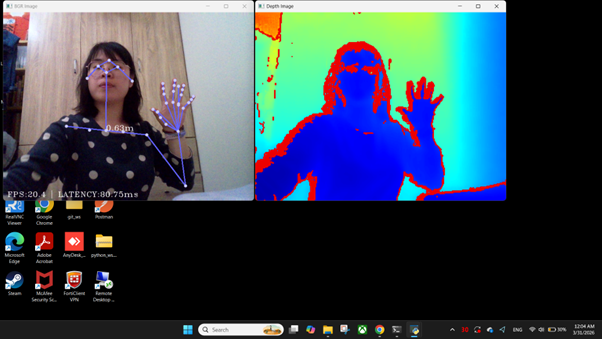
Full Code #
# Copyright LIPS Corporation. All rights reserved.
import sys
import os
import json
import numpy as np
import cv2

if sys.platform == 'win32':
    LIPSBODYPOSE_SDK_ROOT = os.environ.get("LIPSBODYPOSE_SDK_ROOT")
    CUDA_PATH = os.environ.get("CUDA_PATH")
    os.add_dll_directory(LIPSBODYPOSE_SDK_ROOT+"bin")
    os.add_dll_directory(LIPSBODYPOSE_SDK_ROOT+"bin\\OpenNI2\\Drivers")
    os.add_dll_directory(LIPSBODYPOSE_SDK_ROOT+"3rdparty\\openvino\\bin")
    os.add_dll_directory(LIPSBODYPOSE_SDK_ROOT+"3rdparty\\zlib\\bin")
    os.add_dll_directory(CUDA_PATH+"\\bin")

import pylipsbodypose as pose
def convertInt(point2d):
    return (int(point2d[0]+0.5),
            int(point2d[1]+0.5))
def drawSkeletons(img, skeletons):
    connection_pairs = [
        # Face
        ('R_EYE', 'R_EAR'),
        ('L_EYE', 'L_EAR'),
        ('R_EYE', 'NOSE'),
        ('L_EYE', 'NOSE'),
        ('R_EYE', 'HEAD'),
        ('L_EYE', 'HEAD'),
        # Body
        ('NOSE', 'NECK'),
        ('NECK', 'R_SHOULDER'),
        ('NECK', 'L_SHOULDER'),
        ('R_SHOULDER', 'R_HIP'),
        ('L_SHOULDER', 'L_HIP'),
        ('L_HIP', 'R_HIP'),
        ('NECK', 'CHEST_SPINE'),
        ('CHEST_SPINE', 'NAVEL_SPINE'),
        ('NAVEL_SPINE', 'PELVIS'),
        # Right arm
        ('R_SHOULDER', 'R_ELBOW'),
        ('R_ELBOW', 'R_WRIST'),
        ('R_WRIST', 'R_HAND'),
        ('R_WRIST', 'R_THUMB_TIP'),
        ('R_HAND', 'R_HAND_TIP'),
        # Left arm
        ('L_SHOULDER', 'L_ELBOW'),
        ('L_ELBOW', 'L_WRIST'),
        ('L_WRIST', 'L_HAND'),
        ('L_WRIST', 'L_THUMB_TIP'),
        ('L_HAND', 'L_HAND_TIP'),
        # Right leg
        ('R_HIP', 'R_KNEE'),
        ('R_KNEE', 'R_ANKLE'),
        ('R_ANKLE', 'R_FOOT'),
        # Left leg
        ('L_HIP', 'L_KNEE'),
        ('L_KNEE', 'L_ANKLE'),
        ('L_ANKLE', 'L_FOOT'),
        # Right hand
        ('R_WRIST', 'HAND_R_THUMB_CMC'),
        ('HAND_R_THUMB_CMC', 'HAND_R_THUMB_MCP'),
        ('HAND_R_THUMB_MCP', 'HAND_R_THUMB_IP'),
        ('HAND_R_THUMB_IP', 'HAND_R_THUMB_TIP'),
        ('R_WRIST', 'HAND_R_INDEX_MCP'),
        ('HAND_R_INDEX_MCP', 'HAND_R_INDEX_PIP'),
        ('HAND_R_INDEX_PIP', 'HAND_R_INDEX_DIP'),
        ('HAND_R_INDEX_DIP', 'HAND_R_INDEX_TIP'),
        ('R_WRIST', 'HAND_R_MIDDLE_MCP'),
        ('HAND_R_MIDDLE_MCP', 'HAND_R_MIDDLE_PIP'),
        ('HAND_R_MIDDLE_PIP', 'HAND_R_MIDDLE_DIP'),
        ('HAND_R_MIDDLE_DIP', 'HAND_R_MIDDLE_TIP'),
        ('R_WRIST', 'HAND_R_RING_MCP'),
        ('HAND_R_RING_MCP', 'HAND_R_RING_PIP'),
        ('HAND_R_RING_PIP', 'HAND_R_RING_DIP'),
        ('HAND_R_RING_DIP', 'HAND_R_RING_TIP'),
        ('R_WRIST', 'HAND_R_LITTLE_MCP'),
        ('HAND_R_LITTLE_MCP', 'HAND_R_LITTLE_PIP'),
        ('HAND_R_LITTLE_PIP', 'HAND_R_LITTLE_DIP'),
        ('HAND_R_LITTLE_DIP', 'HAND_R_LITTLE_TIP'),
        # Left hand
        ('L_WRIST', 'HAND_L_THUMB_CMC'),
        ('HAND_L_THUMB_CMC', 'HAND_L_THUMB_MCP'),
        ('HAND_L_THUMB_MCP', 'HAND_L_THUMB_IP'),
        ('HAND_L_THUMB_IP', 'HAND_L_THUMB_TIP'),
        ('L_WRIST', 'HAND_L_INDEX_MCP'),
        ('HAND_L_INDEX_MCP', 'HAND_L_INDEX_PIP'),
        ('HAND_L_INDEX_PIP', 'HAND_L_INDEX_DIP'),
        ('HAND_L_INDEX_DIP', 'HAND_L_INDEX_TIP'),
        ('L_WRIST', 'HAND_L_MIDDLE_MCP'),
        ('HAND_L_MIDDLE_MCP', 'HAND_L_MIDDLE_PIP'),
        ('HAND_L_MIDDLE_PIP', 'HAND_L_MIDDLE_DIP'),
        ('HAND_L_MIDDLE_DIP', 'HAND_L_MIDDLE_TIP'),
        ('L_WRIST', 'HAND_L_RING_MCP'),
        ('HAND_L_RING_MCP', 'HAND_L_RING_PIP'),
        ('HAND_L_RING_PIP', 'HAND_L_RING_DIP'),
        ('HAND_L_RING_DIP', 'HAND_L_RING_TIP'),
        ('L_WRIST', 'HAND_L_LITTLE_MCP'),
        ('HAND_L_LITTLE_MCP', 'HAND_L_LITTLE_PIP'),
        ('HAND_L_LITTLE_PIP', 'HAND_L_LITTLE_DIP'),
        ('HAND_L_LITTLE_DIP', 'HAND_L_LITTLE_TIP')
    ]

    color_list = [(255, 100, 100),
                  (255, 255, 100),
                  (100, 255, 100),
                  (100, 255, 255),
                  (100, 100, 255)]
    # skeletons = [{ 'id': 12,
    #                'keypoints': { 'NOSE': {'is_valid': True,  'point2d': (x, y), 'point3d': (x, y, z)},
    #                               'NECK': {'is_valid': False, 'point2d': (0, 0), 'point3d': (0, 0, 0)},
    #                               ... }
    #              }, {}, ... , {}]
    for skeleton in skeletons:
        # Draw connection lines
        color_idx = skeleton['id'] % len(color_list)
        line_color = color_list[color_idx]
        line_width = 2
        for pair in connection_pairs:
            keypoint_a = skeleton['keypoints'][pair[0]]
            keypoint_b = skeleton['keypoints'][pair[1]]
            if keypoint_a['is_valid'] and keypoint_b['is_valid']:
                cv2.line(img, convertInt(keypoint_a['point2d']), convertInt(keypoint_b['point2d']),
                         line_color, line_width)

        # Draw keypoints
        circle_color = (line_color[0]+100,
                        line_color[1]+100,
                        line_color[2]+100)
        circle_radius = 4
        circle_line_width = -1  # solid
        for keypoint in skeleton['keypoints'].values():
            if keypoint['is_valid']:
                cv2.circle(img, convertInt(keypoint['point2d']),
                           circle_radius, circle_color, circle_line_width)

        # Draw distance text
        keypoint_neck = skeleton['keypoints']['NECK']
        if keypoint_neck['is_valid']:
            # Get z value of neck's 3D position in millimeter
            distance_mm = keypoint_neck['point3d'][2]
            distance_m = round(distance_mm/1000, 2)

            text = str(distance_m) + "m"
            org = convertInt(keypoint_neck['point2d'])
            font_face = cv2.FONT_HERSHEY_COMPLEX_SMALL
            font_scale = 1
            color = (255, 255, 255)
            cv2.putText(img, text, org, font_face, font_scale, color)

    return img
def colorizeDepthMap(depth, display_min_z=300, display_max_z=3000):
    normalize_alpha = 255.0 / (display_max_z-display_min_z)
    normalize_beta = (-255.0*display_min_z) / (display_max_z-display_min_z)

    depth_normal = (depth*normalize_alpha + normalize_beta).astype(np.uint8)
    output = cv2.applyColorMap(depth_normal, cv2.COLORMAP_JET)

    return output
def drawProfileInfo(img, profile_info):
    height, width, channels = img.shape

    fps = round(profile_info['fps'], 2)
    latency = round(profile_info['latency_ms'], 2)

    text = "FPS:" + str(fps) + " | LATENCY:" + str(latency) + "ms"
    org = (10, height-10)
    font_face = cv2.FONT_HERSHEY_COMPLEX_SMALL
    font_scale = 1
    color = (255, 255, 255)
    cv2.putText(img, text, org, font_face, font_scale, color)

    return img
def main():
    config = {}
    if sys.platform == 'win32':
        config['runtime_dir'] = LIPSBODYPOSE_SDK_ROOT + "bin"
    config['mirroring'] = True
    config['profiling'] = True

    pose.run(json.dumps(config))

    versions = pose.getVersions()
    print("LIPSBodyPose version: ", versions['LIPSBodyPose'])
    print("Camera SDK   version: ", versions['Camera_SDK'])

    fx, fy, ppx, ppy = pose.getIntrinsics()
    print("Camera intrinsics: fx={}, fy={}, ppx={}, ppy={}".format(fx, fy, ppx, ppy))

    print("Current config: \n", pose.dumpConfig())

    print("\nPress ESC to exit")
    while True:
        key_input = cv2.waitKey(1)

        if key_input == 27:  # press ESC to exit
            break

        depth_image_mm, color_image_bgr, skeletons, profile_info = pose.readFrame()

        color_image_bgr = drawSkeletons(color_image_bgr, skeletons)
        color_image_bgr = drawProfileInfo(color_image_bgr, profile_info)

        cv2.imshow("BGR Image", color_image_bgr)
        cv2.imshow("Depth Image", colorizeDepthMap(depth_image_mm))

    pose.stop()
    cv2.destroyAllWindows()


if __name__ == '__main__':
    sys.exit(main())