
Overview #
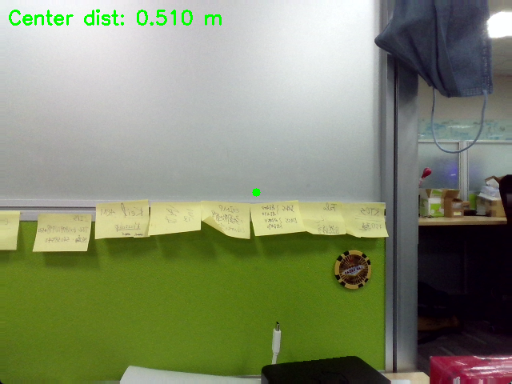
Measuring distances using depth data.
Expected Output #
Prerequisite #
Tutorial #
C++
int cx_rgb = bgrImg.cols / 2;
int cy_rgb = bgrImg.rows / 2;

int dx, dy;
if (device.getImageRegistrationMode() == IMAGE_REGISTRATION_DEPTH_TO_COLOR &&
                bgrImg.size() == depth16.size())
            {

                dx = cx_rgb;
                dy = cy_rgb;
            }
else {
dx = static_cast<int>(cx_rgb * (double)depth16.cols/bgrImg.cols);
      dy = static_cast<int>(cy_rgb * (double)depth16.rows /bgrImg.rows);
}- Compute the center pixel of the RGB image
- If depth is registered to color, use the same coordinates
- Otherwise, map coordinates using resolution scaling
C++
circle(bgrImg, Point(cx_rgb, cy_rgb), 5, Scalar(0, 255, 0), -1);
putText(bgrImg, format("Center dist: %.3f m", dist_m), Point(10, 30),
FONT_HERSHEY_SIMPLEX, 0.8, Scalar(0, 255, 0), 2);- Displays center pixel location
- Overlays real-time distance text