Skip to content
No results
Purple hexagonal logo with white diamond-shaped center featuring geometric star pattern design suitable for corporate branding and digital applications
LIPS®Developer
Documentation
Back To LIPS
Purple hexagonal logo with white diamond-shaped center featuring geometric star pattern design suitable for corporate branding and digital applications
LIPS®Developer
Documentation
Back To LIPS

Quick Introduction

7
  • LIPS® Documentation Overview
  • 3D Depth Camera Tech Overview
  • Depth Image
  • Understanding Depth
  • An Ideal Depth Camera
  • LIPSedge™ AE Series Camera Selection Guide
  • Frequently Asked Questions

LIPSedge Documents

57
  • LIPSMetric™ ST110d
    • User’s Manual
    • SDK Release
  • LIPSMetric™ ST115b
    • User’s Manual
    • SDK Release
  • LIPSMetric™ HA110-M
    • User’s Manual
    • SDK Release
  • LIPSMetric™ HA115a
    • SDK Release
    • User’s Manual
  • LIPSedge™ AE400 / AE450
    • LIPSedge™ AE400 / AE450 Complementary Documents
      • Certifications Documents
      • STEP files for CAD Use
      • Firmware
    • LIPSedge™ AE400 / AE450 User Guide
      • LIPSedge™ AE400 / AE450
      • User Guide
      • Previous Releases (Archive)
    • LIPSedge™ AE400 / AE450 SDK Release
      • SDK Release
      • Previous Releases (Archive)
    • LIPSedge™ AE400 / AE450 Installation
      • Installation
      • Linux
      • Windows
      • ROS Wrapper
      • NVIDIA ISAAC Wrapper
      • Persistent Connection
  • LIPSedge™ AE430 / AE470
    • LIPSedge™ AE430 / AE470 Supplementary Documents
      • Firmware
      • STEP files for CAD Use
    • LIPSedge™ AE430 / AE470 User Guide
      • LIPSedge™ AE430 / AE470
      • User Guide
      • Previous Releases (Archive)
    • LIPSedge™ AE430 / AE470 SDK Release
      • SDK Release
      • Previous Releases (Archive)
  • LIPSedge™ DL & M3 Series
    • LIPSedge™ DL & M3 Series Installation
      • Installation
      • Ubuntu
      • Windows
    • LIPSedge™ DL & M3 Supplementary Documents
      • STEP files for CAD Use
    • LIPSedge™ DL & M3 Series SDK Release
      • SDK Release
      • Changelog
      • Previous Releases (Archive)
    • LIPSedge™ DL & M3 Series User Guide
      • LIPSedge™ DL & M3 Series
      • User Guide
      • Previous Releases (Archive)
  • LIPSedge™ L215u / L210u
    • LIPSedge™ L215u / L210u User Guide
      • LIPSedge™ L215u / L210u
      • User Guide
      • Previous Releases (Archive)
    • LIPSedge™ L215u / L210u SDK Release
      • SDK Release
      • Changelog
      • Previous Releases (Archive)
    • LIPSedge™ L215u / L210u Installation
      • Installation
      • Linux
      • Windows
    • LIPSedge™ L215u / L210u Supplementary Documents
      • STEP files for CAD Use
  • LIPSedge™ L235
    •  LIPSedge™ L235 User’s Manual
    • LIPSedge™ L235 SDK Release
  • LIPSedge™ S Series
    • LIPSedge™ S Series User Guide
      •  LIPSedge™ S Series
      • User Guide
    • LIPSedge™ S Series SDK Release
      • SDK Release
    • LIPSedge™ S Series Installation
      • Windows
  • LIPSedge™ AE430-DK / AE470-DK
    • LIPSedge™ AE430-DK / AE470-DK
    • User Guide

LIPSedge™ SDK 1.x

82
  • Introduction to LIPSedge™ SDK 1.x
    • LIPSedge™ SDK 1.x
    • Benefits from LIPSedge™ SDK implementation
    • LIPSedge™ SDK 1.x Installation Architecture
    • How to identify each camera SDK
  • Tutorial and deployment
    • Tutorials
    • Development and Deployment on arm64
  • Features Articles
    • Features Articles
    • LIPSedge™ SDK Persistent Connection for PoE and USB
  • LIPSedge™ SDK Frameworks
    • LIPSedge™ SDK Frameworks
    • ROS
    • ROS2
    • NVIDIA Isaac Wrapper
    • GenICam (for Halcon / Aurora Vision)
      • GenICam (for Halcon / Aurora Vision)
      • User Manual
      • Driver(.cti) and Nodemap (.xml)
      • Supported LIPSedge™ Camera SDK
      • Installation Example
  • LIPSedge™ SDK v1.02 Tools
    • LIPSedge™ SDK v1.02 Tools
    • DepthViewer
    • PointCloudViewer
    • CameraParameterViewer
    • CameraCenterViewer
    • CameraEventListener
    • CameraPowerTest
    • LensModeSelector
    • LIPSImuReader
    • CameraSimpleViewer
    • RawFileViewer
  • LIPSedge™ SDK Languages & Libraries
    • LIPSedge™ SDK Languages & Libraries
    • OpenCV
    • C++
      • C++
      • environment-setup
      • hello-lipsedge-sdk
      • opencv-viewer
      • roi
      • depth-data
      • align-depth-color
      • range-filter
      • remove-background
      • record
      • pointcloud
      • config-resolution
      • camera-parameter
      • align
      • distance
      • grabcuts
      • measure
      • motion
      • post-processing
      • save-to-disk
      • sensor-control
    • Python
      • Python
      • environment-setup
      • hello-lipsedge-sdk
      • opencv-viewer
      • roi
      • depth-data
      • align-depth-color
      • range-filter
      • remove-background
      • record
    • Java
      • Java
      • ni-hello
    • C#
      • C#
      • ni-hello
      • simple-read
  • New Features for v1.02
    • New Features for v1.02
    • Installing and identifying packages on Windows
    • Saving Captures and Videos with the DepthViewer
    • Saving Point Cloud with PointCloudViewer
    • Live On-Screen displaying Depth, FPS
    • Live On-Screen displaying XYZ parameters in RawfileViewer
    • Distance measurement on-screen from point-to-point
    • Mouse Pointer Change
    • LIPSedge™ AE and S series Colormap new feature addition
    • Simple naming for LIPSedge™ SDK Tools
    • Importing parameters from .json files for LIPSedge™ AE and S series
  • LIPSedge™ SDK Sample Codes
    • LIPSedge™ SDK Sample Codes
    • Sample Applications & Viewer & Utilities
      • Sample Applications & Viewer & Utilities
      • ni-viewer
      • ni-pointcloud-gl
      • ni-camera-matrix

LIPSense Documents

33
  • LIPSense™ 3D Body Pose Middleware
    • LIPSense™ 3D Body Pose SDK
    • User Manual & SDK Download
    • License Management
    • Changelog
    • Previous Releases (Archive)
    • Examples
      • Python
        • Python
        • python_example
      • c#
        • SkeletonCSharp
        • C#
      • C++
        • C++
        • skeleton_example
        • skeleton_opencv
  • LIPScan 3D ™ Middleware
    • LIPScan 3D ™ Middleware
    • LIPScan 3D™ Desktop
      • LIPScan 3D™ Desktop
      • User Guide
      • Application Download
      • Release Notes
      • Previous Releases
    • LIPScan 3D™ SDK
      • LIPScan 3D™ SDK
      • User Guide
      • SDK Download
      • Release Notes
      • Previous Releases
  • LIPSFace™ SDK
    • LIPSFace™ SDK
    • LIPSFace Overview
    • Changelog
  • LIPSFace™ HW120/125 On-Device 3D Facial Recognition
    • LIPSFace™ HW120/125 On-Device 3D Facial Recognition
    • User Guide
    • SDK Download
    • STEP files for CAD Use
  • LIPSFace™ HW110/115 On-Device 3D Facial Recognition
    • LIPSFace™ HW110/115 On-Device 3D Facial Recognition
    • User Guide & SDK Download
    • STEP files for CAD Use

LIPSMetric Documents

9
  • LIPSMetric™ Measure Master
    • User’s Manual
    • SDK Release
  • LIPSMetric™ VD115 Vehicle Dimensioner
    • LIPSMetric™ VD115 Vehicle Dimensioner
  • LIPSMetric™ ST115 Static Dimensioner
    • LIPSMetric™ ST115 Static Dimensioner
    • User’s Manual
  • LIPSMetric™ ST130 Pallet Dimensioner
    • LIPSMetric™ ST130 Pallet Dimensioner
    • User Guide
  • LIPSMetric™ HA110 Handheld Dimensioner
    • LIPSMetric™ HA110 Handheld Dimensioner
    • User’s Manual

Other LIPS Documents

1
  • LIPS License Management
    • LIPS License Management
View Categories
  • Home
  • LIPS® Developer Documentation
  • LIPSedge™ SDK 1.x
  • LIPSedge™ SDK Languages & Libraries
  • C#
  • C#

C#

Examples #

NameDescription
NiHello.Netsimple hello program to demo openni device enumeration
SimpleRead.Netdemo how to stream depth frame and read pixel data

Prerequisite #

Install cmake and opencv.

Windows #

Install cmake, OpenCV and Visual Studio (we use VS2017).

Prepare OpenNI2 driver #

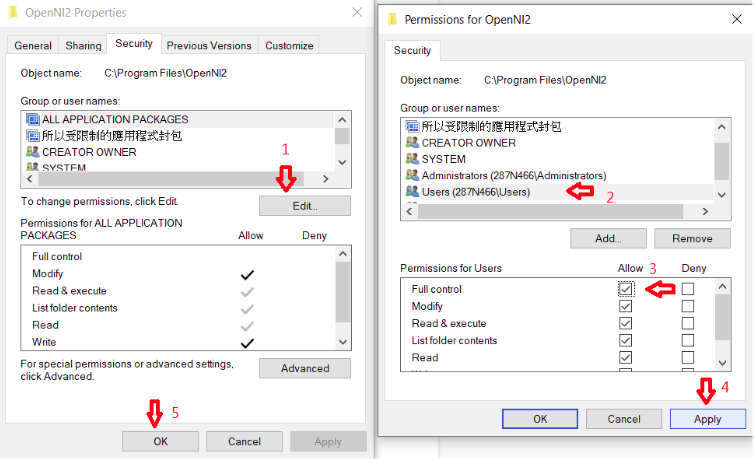
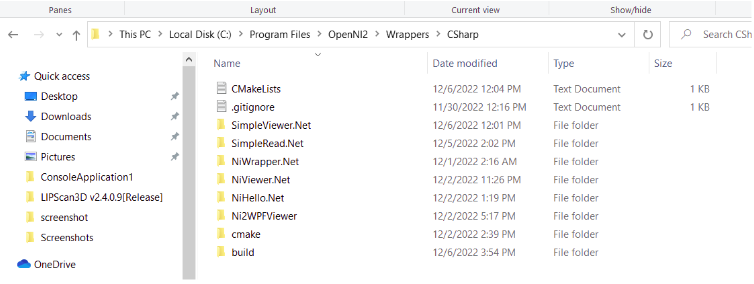
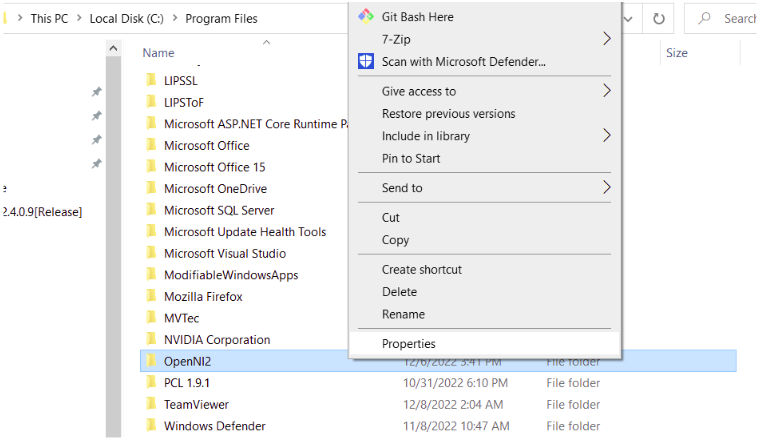
1. Go to C:/Program Files and Right-Click the folder OpenNI2. Enter into Properties > Security > Edit > Users, tick Full Control > Apply > OK to change permission of OpenNI2 folder.
Csharp1 | LIPS® Developer Documentation
Csharp2 | LIPS® Developer Documentation
Csharp3 | LIPS® Developer Documentation

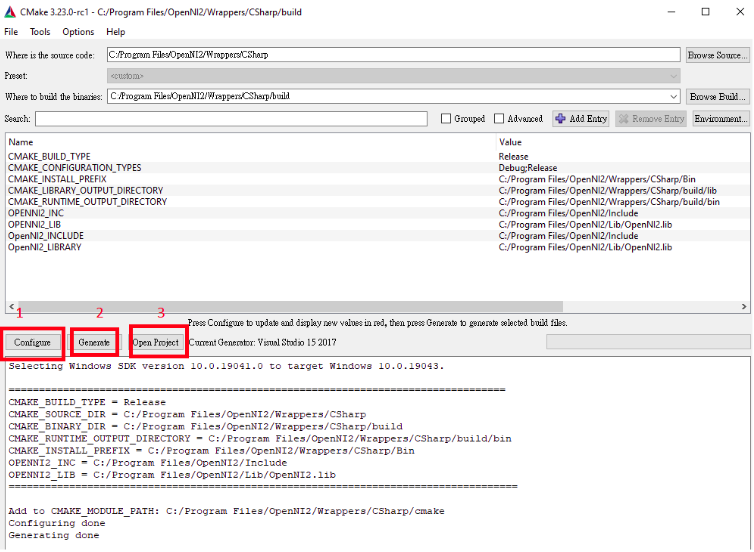
2. Open cmake-gui and set the source code to C:/Program Files/OpenNI2/Wrapper/Csharp and build the folder to wherever you want. Then click Configure, choose your Visual Studio version and other options remain default. After configuring is done, click Generate. After generating is done, click Open Project.
Csharp4 | LIPS® Developer Documentation

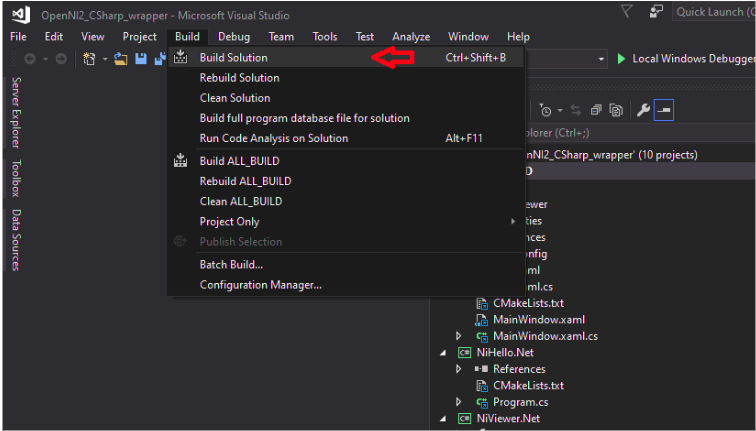
3. After Visual Studio is opened, click Build -> Build Solution and wait for a while.
Csharp5 | LIPS® Developer Documentation

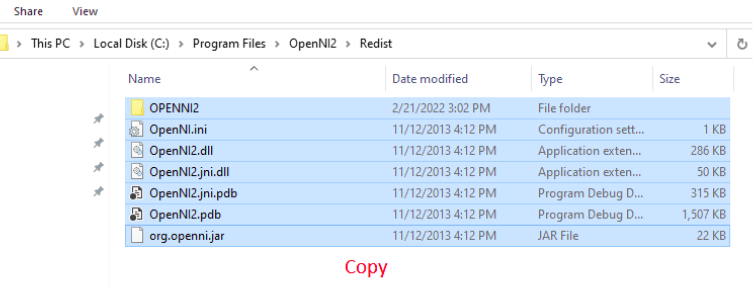
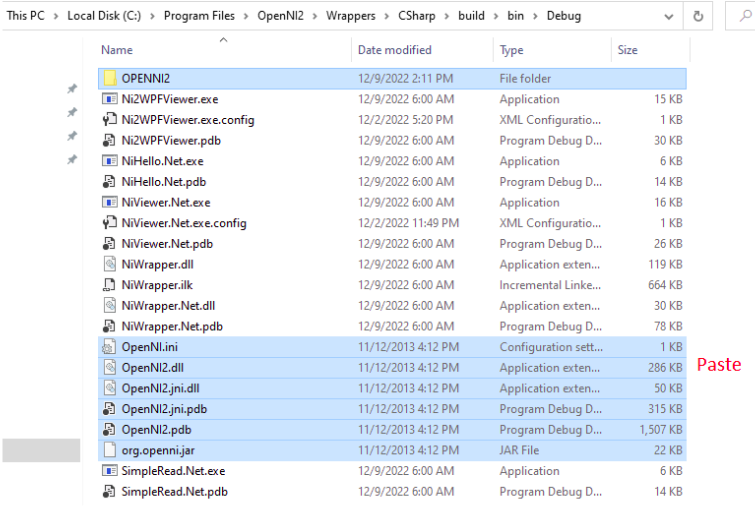
4. Go to Program Files > OpenNi2 > Redist. Copy all the files in the Redist folder to the Debug / Release folder
Csharp6 | LIPS® Developer Documentation
Csharp7 | LIPS® Developer Documentation
Updated on 2025 年 7 月 28 日
LIPSedge SDK

simple-readni-hello
Table of Contents
  • Examples
  • Prerequisite
    • Windows
  • Prepare OpenNI2 driver

#LIPS

About Us

Store

Blog

Terms of Use

DEVELOPER

Technical Support

SDK Download

Code Samples

Github

Copyright © 2026 LIPS Corporation | Privacy Policy | Cookie Policy | Do Not Sell My Personal Information