
Skip to content
No results
Purple hexagonal logo with white diamond-shaped center featuring geometric star pattern design suitable for corporate branding and digital applications
LIPS®Developer
Documentation
Back To LIPS
Purple hexagonal logo with white diamond-shaped center featuring geometric star pattern design suitable for corporate branding and digital applications
LIPS®Developer
Documentation
Back To LIPS

Quick Introduction

7
  • LIPS® Documentation Overview
  • 3D Depth Camera Tech Overview
  • Depth Image
  • Understanding Depth
  • An Ideal Depth Camera
  • LIPSedge™ AE Series Camera Selection Guide
  • Frequently Asked Questions

LIPSedge Documents

57
  • LIPSMetric™ ST110d
    • User’s Manual
    • SDK Release
  • LIPSMetric™ ST115b
    • User’s Manual
    • SDK Release
  • LIPSMetric™ HA110-M
    • User’s Manual
    • SDK Release
  • LIPSMetric™ HA115a
    • SDK Release
    • User’s Manual
  • LIPSedge™ AE400 / AE450
    • LIPSedge™ AE400 / AE450 Complementary Documents
      • Certifications Documents
      • STEP files for CAD Use
      • Firmware
    • LIPSedge™ AE400 / AE450 User Guide
      • LIPSedge™ AE400 / AE450
      • User Guide
      • Previous Releases (Archive)
    • LIPSedge™ AE400 / AE450 SDK Release
      • SDK Release
      • Previous Releases (Archive)
    • LIPSedge™ AE400 / AE450 Installation
      • Installation
      • Linux
      • Windows
      • ROS Wrapper
      • NVIDIA ISAAC Wrapper
      • Persistent Connection
  • LIPSedge™ AE430 / AE470
    • LIPSedge™ AE430 / AE470 Supplementary Documents
      • Firmware
      • STEP files for CAD Use
    • LIPSedge™ AE430 / AE470 User Guide
      • LIPSedge™ AE430 / AE470
      • User Guide
      • Previous Releases (Archive)
    • LIPSedge™ AE430 / AE470 SDK Release
      • SDK Release
      • Previous Releases (Archive)
  • LIPSedge™ DL & M3 Series
    • LIPSedge™ DL & M3 Series Installation
      • Installation
      • Ubuntu
      • Windows
    • LIPSedge™ DL & M3 Supplementary Documents
      • STEP files for CAD Use
    • LIPSedge™ DL & M3 Series SDK Release
      • SDK Release
      • Changelog
      • Previous Releases (Archive)
    • LIPSedge™ DL & M3 Series User Guide
      • LIPSedge™ DL & M3 Series
      • User Guide
      • Previous Releases (Archive)
  • LIPSedge™ L215u / L210u
    • LIPSedge™ L215u / L210u User Guide
      • LIPSedge™ L215u / L210u
      • User Guide
      • Previous Releases (Archive)
    • LIPSedge™ L215u / L210u SDK Release
      • SDK Release
      • Changelog
      • Previous Releases (Archive)
    • LIPSedge™ L215u / L210u Installation
      • Installation
      • Linux
      • Windows
    • LIPSedge™ L215u / L210u Supplementary Documents
      • STEP files for CAD Use
  • LIPSedge™ L235
    •  LIPSedge™ L235 User’s Manual
    • LIPSedge™ L235 SDK Release
  • LIPSedge™ S Series
    • LIPSedge™ S Series User Guide
      •  LIPSedge™ S Series
      • User Guide
    • LIPSedge™ S Series SDK Release
      • SDK Release
    • LIPSedge™ S Series Installation
      • Windows
  • LIPSedge™ AE430-DK / AE470-DK
    • LIPSedge™ AE430-DK / AE470-DK
    • User Guide

LIPSedge™ SDK 1.x

82
  • Introduction to LIPSedge™ SDK 1.x
    • LIPSedge™ SDK 1.x
    • Benefits from LIPSedge™ SDK implementation
    • LIPSedge™ SDK 1.x Installation Architecture
    • How to identify each camera SDK
  • Tutorial and deployment
    • Tutorials
    • Development and Deployment on arm64
  • Features Articles
    • Features Articles
    • LIPSedge™ SDK Persistent Connection for PoE and USB
  • LIPSedge™ SDK Frameworks
    • LIPSedge™ SDK Frameworks
    • ROS
    • ROS2
    • NVIDIA Isaac Wrapper
    • GenICam (for Halcon / Aurora Vision)
      • GenICam (for Halcon / Aurora Vision)
      • User Manual
      • Driver(.cti) and Nodemap (.xml)
      • Supported LIPSedge™ Camera SDK
      • Installation Example
  • LIPSedge™ SDK v1.02 Tools
    • LIPSedge™ SDK v1.02 Tools
    • DepthViewer
    • PointCloudViewer
    • CameraParameterViewer
    • CameraCenterViewer
    • CameraEventListener
    • CameraPowerTest
    • LensModeSelector
    • LIPSImuReader
    • CameraSimpleViewer
    • RawFileViewer
  • LIPSedge™ SDK Languages & Libraries
    • LIPSedge™ SDK Languages & Libraries
    • OpenCV
    • C++
      • C++
      • environment-setup
      • hello-lipsedge-sdk
      • opencv-viewer
      • roi
      • depth-data
      • align-depth-color
      • range-filter
      • remove-background
      • record
      • pointcloud
      • config-resolution
      • camera-parameter
      • align
      • distance
      • grabcuts
      • measure
      • motion
      • post-processing
      • save-to-disk
      • sensor-control
    • Python
      • Python
      • environment-setup
      • hello-lipsedge-sdk
      • opencv-viewer
      • roi
      • depth-data
      • align-depth-color
      • range-filter
      • remove-background
      • record
    • Java
      • Java
      • ni-hello
    • C#
      • C#
      • ni-hello
      • simple-read
  • New Features for v1.02
    • New Features for v1.02
    • Installing and identifying packages on Windows
    • Saving Captures and Videos with the DepthViewer
    • Saving Point Cloud with PointCloudViewer
    • Live On-Screen displaying Depth, FPS
    • Live On-Screen displaying XYZ parameters in RawfileViewer
    • Distance measurement on-screen from point-to-point
    • Mouse Pointer Change
    • LIPSedge™ AE and S series Colormap new feature addition
    • Simple naming for LIPSedge™ SDK Tools
    • Importing parameters from .json files for LIPSedge™ AE and S series
  • LIPSedge™ SDK Sample Codes
    • LIPSedge™ SDK Sample Codes
    • Sample Applications & Viewer & Utilities
      • Sample Applications & Viewer & Utilities
      • ni-viewer
      • ni-pointcloud-gl
      • ni-camera-matrix

LIPSense Documents

33
  • LIPSense™ 3D Body Pose Middleware
    • LIPSense™ 3D Body Pose SDK
    • User Manual & SDK Download
    • License Management
    • Changelog
    • Previous Releases (Archive)
    • Examples
      • Python
        • Python
        • python_example
      • c#
        • SkeletonCSharp
        • C#
      • C++
        • C++
        • skeleton_example
        • skeleton_opencv
  • LIPScan 3D ™ Middleware
    • LIPScan 3D ™ Middleware
    • LIPScan 3D™ Desktop
      • LIPScan 3D™ Desktop
      • User Guide
      • Application Download
      • Release Notes
      • Previous Releases
    • LIPScan 3D™ SDK
      • LIPScan 3D™ SDK
      • User Guide
      • SDK Download
      • Release Notes
      • Previous Releases
  • LIPSFace™ SDK
    • LIPSFace™ SDK
    • LIPSFace Overview
    • Changelog
  • LIPSFace™ HW120/125 On-Device 3D Facial Recognition
    • LIPSFace™ HW120/125 On-Device 3D Facial Recognition
    • User Guide
    • SDK Download
    • STEP files for CAD Use
  • LIPSFace™ HW110/115 On-Device 3D Facial Recognition
    • LIPSFace™ HW110/115 On-Device 3D Facial Recognition
    • User Guide & SDK Download
    • STEP files for CAD Use

LIPSMetric Documents

9
  • LIPSMetric™ Measure Master
    • User’s Manual
    • SDK Release
  • LIPSMetric™ VD115 Vehicle Dimensioner
    • LIPSMetric™ VD115 Vehicle Dimensioner
  • LIPSMetric™ ST115 Static Dimensioner
    • LIPSMetric™ ST115 Static Dimensioner
    • User’s Manual
  • LIPSMetric™ ST130 Pallet Dimensioner
    • LIPSMetric™ ST130 Pallet Dimensioner
    • User Guide
  • LIPSMetric™ HA110 Handheld Dimensioner
    • LIPSMetric™ HA110 Handheld Dimensioner
    • User’s Manual

Other LIPS Documents

1
  • LIPS License Management
    • LIPS License Management
View Categories
  • Home
  • LIPS® Developer Documentation
  • LIPSedge™ SDK 1.x
  • LIPSedge™ SDK Languages & Libraries
  • C++
  • post-processing

post-processing

Overview #

Applying filters or other post-processing techniques to data.

Expected Output #
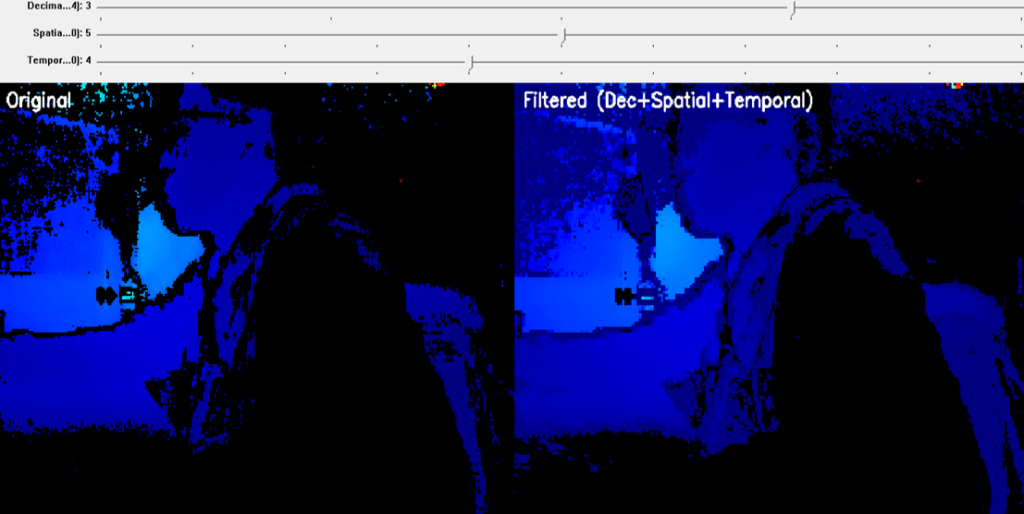
Picture6 | LIPS® Developer Documentation

Prerequisite #

  • OpenCV Viewer

Tutorial #

C++
if (decFactor > 1) {
            Size smallSize(depth16.cols / decFactor, depth16.rows / decFactor);
            resize(depth16, depthDec, smallSize, 0, 0, INTER_NEAREST);
        }
        else {
            depthDec = depth16.clone();
        }

Decimation

  • Reduces resolution by an integer factor (1 = no decimation).
  • Uses INTER_NEAREST to avoid interpolating fake depth values.
  • Smaller resolution means less noise and faster processing.
C++
Mat depthFloat, depthSpatial;
        depthDec.convertTo(depthFloat, CV_32F);

        int mag = spatial_mag_slider;    // 0~10
        if (mag < 0) mag = 0;

        int diameter = 1 + mag * 2;   // 1,3,5,...,21
        double sigmaCol = 10.0 + mag * 10.0;
        double sigmaSpa = 10.0 + mag * 10.0;

        if (mag == 0) {
            depthSpatial = depthDec.clone();
        }
        else {
            bilateralFilter(depthFloat, depthSpatial,
                diameter, sigmaCol, sigmaSpa);
            depthSpatial.convertTo(depthSpatial, CV_16UC1);
        }
  • Converts depth to float for more accurate filtering.
  • Uses bilateral filter to smooth noise while preserving edges.
  • Filter strength is controlled by mag (slider):
  • Larger mag → bigger kernel (diameter) and sigmas → stronger smoothing.
  • If mag == 0, spatial filtering is effectively disabled.
C++
Mat depthTemporal16;
        int tSlider = temporal_alpha_slider; // 0~10
        if (tSlider <= 0) {
            // No temporal filter
            depthTemporal16 = depthUp;
            hasTemporalPrev = false;  // reset history
        }
        else {
            float alpha = tSlider / 10.0f; // 0.1~1.0 : weight of current frame

            if (!hasTemporalPrev || depthTemporalPrev16.size() != depthUp.size()) {
                depthTemporalPrev16 = depthUp.clone();
                hasTemporalPrev = true;
            }

            Mat curr32f, prev32f, out32f;
            depthUp.convertTo(curr32f, CV_32F);
            depthTemporalPrev16.convertTo(prev32f, CV_32F);

            // out = alpha * current + (1 - alpha) * previous
            out32f = alpha * curr32f + (1.0f - alpha) * prev32f;

            out32f.convertTo(depthTemporal16, CV_16UC1);
            depthTemporalPrev16 = depthTemporal16.clone();
        }
  • Implements a temporal low-pass filter over consecutive frames:
    • alpha close to 1 → follow new frame closely (less smoothing).
    • alpha close to 0 → very smooth but more “laggy”.
  • When disabled (tSlider <= 0), it bypasses the temporal filter.
  • Maintains depthTemporalPrev16 as the filtered result of the previous frame
Updated on 2026 年 4 月 1 日

motionsave-to-disk
Table of Contents
  • Overview
  • Expected Output
  • Prerequisite
  • Tutorial

#LIPS

About Us

Store

Blog

Terms of Use

DEVELOPER

Technical Support

SDK Download

Code Samples

Github

Copyright © 2026 LIPS Corporation | Privacy Policy | Cookie Policy | Do Not Sell My Personal Information