
Skip to content
No results
Purple hexagonal logo with white diamond-shaped center featuring geometric star pattern design suitable for corporate branding and digital applications
LIPS®Developer
Documentation
Back To LIPS
Purple hexagonal logo with white diamond-shaped center featuring geometric star pattern design suitable for corporate branding and digital applications
LIPS®Developer
Documentation
Back To LIPS

Quick Introduction

7
  • LIPS® Documentation Overview
  • 3D Depth Camera Tech Overview
  • Depth Image
  • Understanding Depth
  • An Ideal Depth Camera
  • LIPSedge™ AE Series Camera Selection Guide
  • Frequently Asked Questions

LIPSedge Documents

57
  • LIPSMetric™ ST110d
    • User’s Manual
    • SDK Release
  • LIPSMetric™ ST115b
    • User’s Manual
    • SDK Release
  • LIPSMetric™ HA110-M
    • User’s Manual
    • SDK Release
  • LIPSMetric™ HA115a
    • SDK Release
    • User’s Manual
  • LIPSedge™ AE400 / AE450
    • LIPSedge™ AE400 / AE450 Complementary Documents
      • Certifications Documents
      • STEP files for CAD Use
      • Firmware
    • LIPSedge™ AE400 / AE450 User Guide
      • LIPSedge™ AE400 / AE450
      • User Guide
      • Previous Releases (Archive)
    • LIPSedge™ AE400 / AE450 SDK Release
      • SDK Release
      • Previous Releases (Archive)
    • LIPSedge™ AE400 / AE450 Installation
      • Installation
      • Linux
      • Windows
      • ROS Wrapper
      • NVIDIA ISAAC Wrapper
      • Persistent Connection
  • LIPSedge™ AE430 / AE470
    • LIPSedge™ AE430 / AE470 Supplementary Documents
      • Firmware
      • STEP files for CAD Use
    • LIPSedge™ AE430 / AE470 User Guide
      • LIPSedge™ AE430 / AE470
      • User Guide
      • Previous Releases (Archive)
    • LIPSedge™ AE430 / AE470 SDK Release
      • SDK Release
      • Previous Releases (Archive)
  • LIPSedge™ DL & M3 Series
    • LIPSedge™ DL & M3 Series Installation
      • Installation
      • Ubuntu
      • Windows
    • LIPSedge™ DL & M3 Supplementary Documents
      • STEP files for CAD Use
    • LIPSedge™ DL & M3 Series SDK Release
      • SDK Release
      • Changelog
      • Previous Releases (Archive)
    • LIPSedge™ DL & M3 Series User Guide
      • LIPSedge™ DL & M3 Series
      • User Guide
      • Previous Releases (Archive)
  • LIPSedge™ L215u / L210u
    • LIPSedge™ L215u / L210u User Guide
      • LIPSedge™ L215u / L210u
      • User Guide
      • Previous Releases (Archive)
    • LIPSedge™ L215u / L210u SDK Release
      • SDK Release
      • Changelog
      • Previous Releases (Archive)
    • LIPSedge™ L215u / L210u Installation
      • Installation
      • Linux
      • Windows
    • LIPSedge™ L215u / L210u Supplementary Documents
      • STEP files for CAD Use
  • LIPSedge™ L235
    •  LIPSedge™ L235 User’s Manual
    • LIPSedge™ L235 SDK Release
  • LIPSedge™ S Series
    • LIPSedge™ S Series User Guide
      •  LIPSedge™ S Series
      • User Guide
    • LIPSedge™ S Series SDK Release
      • SDK Release
    • LIPSedge™ S Series Installation
      • Windows
  • LIPSedge™ AE430-DK / AE470-DK
    • LIPSedge™ AE430-DK / AE470-DK
    • User Guide

LIPSedge™ SDK 1.x

82
  • Introduction to LIPSedge™ SDK 1.x
    • LIPSedge™ SDK 1.x
    • Benefits from LIPSedge™ SDK implementation
    • LIPSedge™ SDK 1.x Installation Architecture
    • How to identify each camera SDK
  • Tutorial and deployment
    • Tutorials
    • Development and Deployment on arm64
  • Features Articles
    • Features Articles
    • LIPSedge™ SDK Persistent Connection for PoE and USB
  • LIPSedge™ SDK Frameworks
    • LIPSedge™ SDK Frameworks
    • ROS
    • ROS2
    • NVIDIA Isaac Wrapper
    • GenICam (for Halcon / Aurora Vision)
      • GenICam (for Halcon / Aurora Vision)
      • User Manual
      • Driver(.cti) and Nodemap (.xml)
      • Supported LIPSedge™ Camera SDK
      • Installation Example
  • LIPSedge™ SDK v1.02 Tools
    • LIPSedge™ SDK v1.02 Tools
    • DepthViewer
    • PointCloudViewer
    • CameraParameterViewer
    • CameraCenterViewer
    • CameraEventListener
    • CameraPowerTest
    • LensModeSelector
    • LIPSImuReader
    • CameraSimpleViewer
    • RawFileViewer
  • LIPSedge™ SDK Languages & Libraries
    • LIPSedge™ SDK Languages & Libraries
    • OpenCV
    • C++
      • C++
      • environment-setup
      • hello-lipsedge-sdk
      • opencv-viewer
      • roi
      • depth-data
      • align-depth-color
      • range-filter
      • remove-background
      • record
      • pointcloud
      • config-resolution
      • camera-parameter
      • align
      • distance
      • grabcuts
      • measure
      • motion
      • post-processing
      • save-to-disk
      • sensor-control
    • Python
      • Python
      • environment-setup
      • hello-lipsedge-sdk
      • opencv-viewer
      • roi
      • depth-data
      • align-depth-color
      • range-filter
      • remove-background
      • record
    • Java
      • Java
      • ni-hello
    • C#
      • C#
      • ni-hello
      • simple-read
  • New Features for v1.02
    • New Features for v1.02
    • Installing and identifying packages on Windows
    • Saving Captures and Videos with the DepthViewer
    • Saving Point Cloud with PointCloudViewer
    • Live On-Screen displaying Depth, FPS
    • Live On-Screen displaying XYZ parameters in RawfileViewer
    • Distance measurement on-screen from point-to-point
    • Mouse Pointer Change
    • LIPSedge™ AE and S series Colormap new feature addition
    • Simple naming for LIPSedge™ SDK Tools
    • Importing parameters from .json files for LIPSedge™ AE and S series
  • LIPSedge™ SDK Sample Codes
    • LIPSedge™ SDK Sample Codes
    • Sample Applications & Viewer & Utilities
      • Sample Applications & Viewer & Utilities
      • ni-viewer
      • ni-pointcloud-gl
      • ni-camera-matrix

LIPSense Documents

33
  • LIPSense™ 3D Body Pose Middleware
    • LIPSense™ 3D Body Pose SDK
    • User Manual & SDK Download
    • License Management
    • Changelog
    • Previous Releases (Archive)
    • Examples
      • Python
        • Python
        • python_example
      • c#
        • SkeletonCSharp
        • C#
      • C++
        • C++
        • skeleton_example
        • skeleton_opencv
  • LIPScan 3D ™ Middleware
    • LIPScan 3D ™ Middleware
    • LIPScan 3D™ Desktop
      • LIPScan 3D™ Desktop
      • User Guide
      • Application Download
      • Release Notes
      • Previous Releases
    • LIPScan 3D™ SDK
      • LIPScan 3D™ SDK
      • User Guide
      • SDK Download
      • Release Notes
      • Previous Releases
  • LIPSFace™ SDK
    • LIPSFace™ SDK
    • LIPSFace Overview
    • Changelog
  • LIPSFace™ HW120/125 On-Device 3D Facial Recognition
    • LIPSFace™ HW120/125 On-Device 3D Facial Recognition
    • User Guide
    • SDK Download
    • STEP files for CAD Use
  • LIPSFace™ HW110/115 On-Device 3D Facial Recognition
    • LIPSFace™ HW110/115 On-Device 3D Facial Recognition
    • User Guide & SDK Download
    • STEP files for CAD Use

LIPSMetric Documents

9
  • LIPSMetric™ Measure Master
    • User’s Manual
    • SDK Release
  • LIPSMetric™ VD115 Vehicle Dimensioner
    • LIPSMetric™ VD115 Vehicle Dimensioner
  • LIPSMetric™ ST115 Static Dimensioner
    • LIPSMetric™ ST115 Static Dimensioner
    • User’s Manual
  • LIPSMetric™ ST130 Pallet Dimensioner
    • LIPSMetric™ ST130 Pallet Dimensioner
    • User Guide
  • LIPSMetric™ HA110 Handheld Dimensioner
    • LIPSMetric™ HA110 Handheld Dimensioner
    • User’s Manual

Other LIPS Documents

1
  • LIPS License Management
    • LIPS License Management
View Categories
  • Home
  • LIPS® Developer Documentation
  • Quick Introduction
  • Understanding Depth

Understanding Depth

When measuring 3D Depth Cameras quality and performance, establishing a common attribute is best to characterize the measurements to represent its performance, hence the preferred metrics but not limited to are its Z-Accuracy, Precision, setting a reasonable Region-of-Interest, and a high-fidelity Point Cloud.

Z-Accuracy #

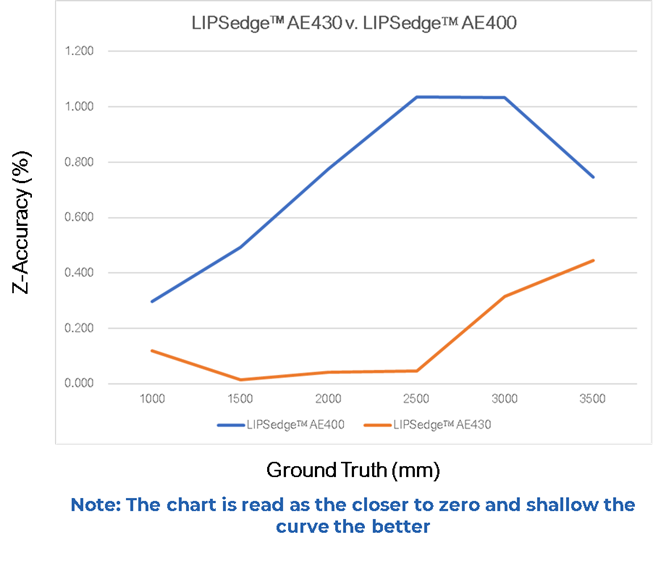
Z-Accuracy measures how close the depth values are close to the actual distance (the Ground Truth). The Z-Accuracy is represented in percentage (%), meaning its variation on its closeness of a measured value to a true value. When looking at an accuracy chart, it is important to consider that a chart is representation of the depth readings at each distance. As the % defines the variation, the closer to zero in its percentage value, the higher the accuracy it is since the variation is minimal closing to zero.

Upon different techniques, improvement and enhancement are made varying each 3D camera to get its best performance for which the cameras are intended for.

In the next chart we can see comparing our LIPSedge™ AE400 vs. LIPSedge™ AE430, the Depth performance was quite improved to meet industry demands.

Comparing the Accuracy between LIPSedge™ AE400 and LIPSedge™ AE430:

The LIPSedge™ AE400 as meant for industrial application use-case had an accuracy from a 0.4% to 1% measured from a range of 1 meter to 3.5 meters, on each distances respectively.

The LIPSedge™ AE430 a light-weight industrial 3D depth camera for more specific uses such as Robotics, required a more accurate readings, hence adjustments were made to improve its depth performance.
AE430vsAE400 | LIPS® Developer Documentation

Precision #

As for Precision, represented by using a metrics value, e.g. millimeters, is the actual distance refers to the closeness among successive measurements carried out with the same method by the same operator under identical conditions.

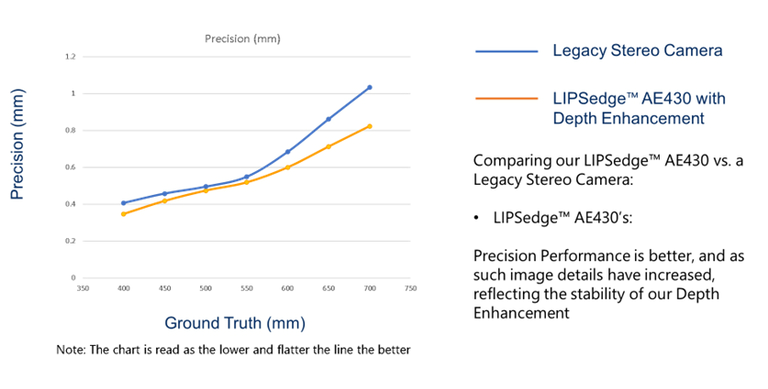
When reading a precision chart, since the values are represented by the iterations of measured values, the lesser the distance the better the precision is, as it would mean the measured values are not scattered, a direct representation of an optimal condition from the optical calibration.

In the next chart, it can be observed for the short-range measurements from the 40 cm to 70 cm range, although the variation compared between the LIPSedge™ AE430 and a Legacy Stereo Camera stand close, the minimal difference is actually a huge gap for what precision demands when detecting at close distance, demonstrating the importance and advantage about readout and the results obtained from the LIPSedge™ AE430.
Precision | LIPS® Developer Documentation

Region of Interest #

Region-of-Interest (known as ROI) is referred to a predefined area from within the Field-of-View of the camera. Such area is adjusted by the user depending on the target object to cover. The ROI would vary upon where the camera is located towards the distance of the target object. A user would need to adjust it based on the desired coverage. An example is if a coverage of a target is satisfactory at 80% of ROI within at 1 meter, if extending such distance to 2 meters, then such coverage would be only 40%.

Point-Cloud #

A composition of all factors from the 3D Camera’s specifications, including:

  • Accuracy
  • Precision
  • Noise
  • Ambient conditions

for which would affect depth performance and its results.

Updated on 2025 年 6 月 10 日
Depth Image Basics

Depth ImageAn Ideal Depth Camera
Table of Contents
  • Z-Accuracy
  • Precision
  • Region of Interest
  • Point-Cloud

#LIPS

About Us

Store

Blog

Terms of Use

DEVELOPER

Technical Support

SDK Download

Code Samples

Github

Copyright © 2026 LIPS Corporation | Privacy Policy | Cookie Policy | Do Not Sell My Personal Information