Skip to content
No results
Purple hexagonal logo with white diamond-shaped center featuring geometric star pattern design suitable for corporate branding and digital applications
LIPS®Developer
Documentation
Back To LIPS
Purple hexagonal logo with white diamond-shaped center featuring geometric star pattern design suitable for corporate branding and digital applications
LIPS®Developer
Documentation
Back To LIPS

Quick Introduction

7
  • LIPS® Documentation Overview
  • 3D Depth Camera Tech Overview
  • Depth Image
  • Understanding Depth
  • An Ideal Depth Camera
  • LIPSedge™ AE Series Camera Selection Guide
  • Frequently Asked Questions

LIPSedge Documents

57
  • LIPSMetric™ ST115b
    • User’s Manual
    • SDK Release
  • LIPSMetric™ HA110-M
    • User’s Manual
    • SDK Release
  • LIPSMetric™ HA115a
    • SDK Release
    • User’s Manual
  • LIPSMetric™ ST110d
    • User’s Manual
    • SDK Release
  • LIPSedge™ AE400 / AE450
    • LIPSedge™ AE400 / AE450 Complementary Documents
      • Certifications Documents
      • STEP files for CAD Use
      • Firmware
    • LIPSedge™ AE400 / AE450 User Guide
      • LIPSedge™ AE400 / AE450
      • User Guide
      • Previous Releases (Archive)
    • LIPSedge™ AE400 / AE450 SDK Release
      • SDK Release
      • Previous Releases (Archive)
    • LIPSedge™ AE400 / AE450 Installation
      • Installation
      • Linux
      • Windows
      • ROS Wrapper
      • NVIDIA ISAAC Wrapper
      • Persistent Connection
  • LIPSedge™ AE430 / AE470
    • LIPSedge™ AE430 / AE470 Supplementary Documents
      • Firmware
      • STEP files for CAD Use
    • LIPSedge™ AE430 / AE470 User Guide
      • LIPSedge™ AE430 / AE470
      • User Guide
      • Previous Releases (Archive)
    • LIPSedge™ AE430 / AE470 SDK Release
      • SDK Release
      • Previous Releases (Archive)
  • LIPSedge™ DL & M3 Series
    • LIPSedge™ DL & M3 Series Installation
      • Installation
      • Ubuntu
      • Windows
    • LIPSedge™ DL & M3 Supplementary Documents
      • STEP files for CAD Use
    • LIPSedge™ DL & M3 Series SDK Release
      • SDK Release
      • Changelog
      • Previous Releases (Archive)
    • LIPSedge™ DL & M3 Series User Guide
      • LIPSedge™ DL & M3 Series
      • User Guide
      • Previous Releases (Archive)
  • LIPSedge™ L215u / L210u
    • LIPSedge™ L215u / L210u User Guide
      • LIPSedge™ L215u / L210u
      • User Guide
      • Previous Releases (Archive)
    • LIPSedge™ L215u / L210u SDK Release
      • SDK Release
      • Changelog
      • Previous Releases (Archive)
    • LIPSedge™ L215u / L210u Installation
      • Installation
      • Linux
      • Windows
    • LIPSedge™ L215u / L210u Supplementary Documents
      • STEP files for CAD Use
  • LIPSedge™ L235
    •  LIPSedge™ L235 User’s Manual
    • LIPSedge™ L235 SDK Release
  • LIPSedge™ S Series
    • LIPSedge™ S Series User Guide
      •  LIPSedge™ S Series
      • User Guide
    • LIPSedge™ S Series SDK Release
      • SDK Release
    • LIPSedge™ S Series Installation
      • Windows
  • LIPSedge™ AE430-DK / AE470-DK
    • LIPSedge™ AE430-DK / AE470-DK
    • User Guide

LIPSedge™ SDK 1.x

82
  • Introduction to LIPSedge™ SDK 1.x
    • LIPSedge™ SDK 1.x
    • Benefits from LIPSedge™ SDK implementation
    • LIPSedge™ SDK 1.x Installation Architecture
    • How to identify each camera SDK
  • Tutorial and deployment
    • Tutorials
    • Development and Deployment on arm64
  • Features Articles
    • Features Articles
    • LIPSedge™ SDK Persistent Connection for PoE and USB
  • LIPSedge™ SDK Frameworks
    • LIPSedge™ SDK Frameworks
    • ROS
    • ROS2
    • NVIDIA Isaac Wrapper
    • GenICam (for Halcon / Aurora Vision)
      • GenICam (for Halcon / Aurora Vision)
      • User Manual
      • Driver(.cti) and Nodemap (.xml)
      • Supported LIPSedge™ Camera SDK
      • Installation Example
  • LIPSedge™ SDK v1.02 Tools
    • LIPSedge™ SDK v1.02 Tools
    • DepthViewer
    • PointCloudViewer
    • CameraParameterViewer
    • CameraCenterViewer
    • CameraEventListener
    • CameraPowerTest
    • LensModeSelector
    • LIPSImuReader
    • CameraSimpleViewer
    • RawFileViewer
  • LIPSedge™ SDK Languages & Libraries
    • LIPSedge™ SDK Languages & Libraries
    • OpenCV
    • C++
      • C++
      • environment-setup
      • hello-lipsedge-sdk
      • opencv-viewer
      • roi
      • depth-data
      • align-depth-color
      • range-filter
      • remove-background
      • record
      • pointcloud
      • config-resolution
      • camera-parameter
      • align
      • distance
      • grabcuts
      • measure
      • motion
      • post-processing
      • save-to-disk
      • sensor-control
    • Python
      • Python
      • environment-setup
      • hello-lipsedge-sdk
      • opencv-viewer
      • roi
      • depth-data
      • align-depth-color
      • range-filter
      • remove-background
      • record
    • Java
      • Java
      • ni-hello
    • C#
      • C#
      • ni-hello
      • simple-read
  • New Features for v1.02
    • New Features for v1.02
    • Installing and identifying packages on Windows
    • Saving Captures and Videos with the DepthViewer
    • Saving Point Cloud with PointCloudViewer
    • Live On-Screen displaying Depth, FPS
    • Live On-Screen displaying XYZ parameters in RawfileViewer
    • Distance measurement on-screen from point-to-point
    • Mouse Pointer Change
    • LIPSedge™ AE and S series Colormap new feature addition
    • Simple naming for LIPSedge™ SDK Tools
    • Importing parameters from .json files for LIPSedge™ AE and S series
  • LIPSedge™ SDK Sample Codes
    • LIPSedge™ SDK Sample Codes
    • Sample Applications & Viewer & Utilities
      • Sample Applications & Viewer & Utilities
      • ni-viewer
      • ni-pointcloud-gl
      • ni-camera-matrix

LIPSense Documents

33
  • LIPSense™ 3D Body Pose Middleware
    • LIPSense™ 3D Body Pose SDK
    • User Manual & SDK Download
    • License Management
    • Changelog
    • Previous Releases (Archive)
    • Examples
      • Python
        • Python
        • python_example
      • c#
        • SkeletonCSharp
        • C#
      • C++
        • C++
        • skeleton_example
        • skeleton_opencv
  • LIPScan 3D ™ Middleware
    • LIPScan 3D ™ Middleware
    • LIPScan 3D™ Desktop
      • LIPScan 3D™ Desktop
      • User Guide
      • Application Download
      • Release Notes
      • Previous Releases
    • LIPScan 3D™ SDK
      • LIPScan 3D™ SDK
      • User Guide
      • SDK Download
      • Release Notes
      • Previous Releases
  • LIPSFace™ SDK
    • LIPSFace™ SDK
    • LIPSFace Overview
    • Changelog
  • LIPSFace™ HW120/125 On-Device 3D Facial Recognition
    • LIPSFace™ HW120/125 On-Device 3D Facial Recognition
    • User Guide
    • SDK Download
    • STEP files for CAD Use
  • LIPSFace™ HW110/115 On-Device 3D Facial Recognition
    • LIPSFace™ HW110/115 On-Device 3D Facial Recognition
    • User Guide & SDK Download
    • STEP files for CAD Use

LIPSMetric Documents

9
  • LIPSMetric™ Measure Master
    • User’s Manual
    • SDK Release
  • LIPSMetric™ VD115 Vehicle Dimensioner
    • LIPSMetric™ VD115 Vehicle Dimensioner
  • LIPSMetric™ ST115 Static Dimensioner
    • LIPSMetric™ ST115 Static Dimensioner
    • User’s Manual
  • LIPSMetric™ ST130 Pallet Dimensioner
    • LIPSMetric™ ST130 Pallet Dimensioner
    • User Guide
  • LIPSMetric™ HA110 Handheld Dimensioner
    • LIPSMetric™ HA110 Handheld Dimensioner
    • User’s Manual

Other LIPS Documents

1
  • LIPS License Management
    • LIPS License Management
View Categories
  • Home
  • LIPS® Developer Documentation
  • Quick Introduction
  • An Ideal Depth Camera

An Ideal Depth Camera

The content can be downloaded from here in a PDF document

An ideal Depth Camera based on the requirements of the application use-case, would:

1. See what is required under its ambient conditions #

, which including:

  • Dark to bright conditions
  • The surrounding objects
  • The range for its workspace
  • No interferences

2. See with little noise, which affect the precision of what is being seen #

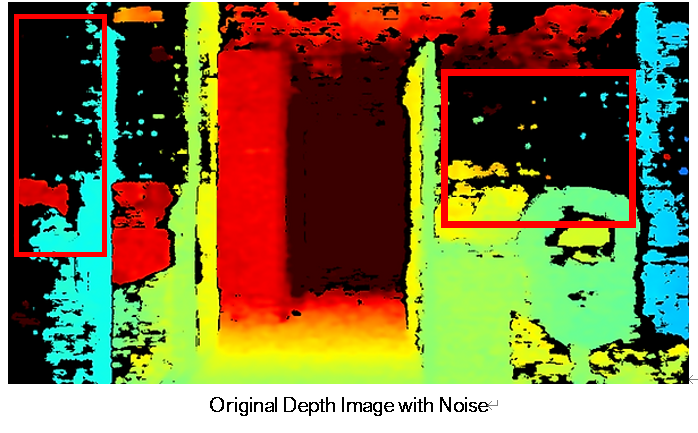
As comparing the below captures, the original capture would show:

  • more noise in areas marked within the red block(left), and
  • the depth is not evident (right):
OriginalDepthImagewNoise | LIPS® Developer Documentation

Depth Enhancement with LIPSedge™ AE430
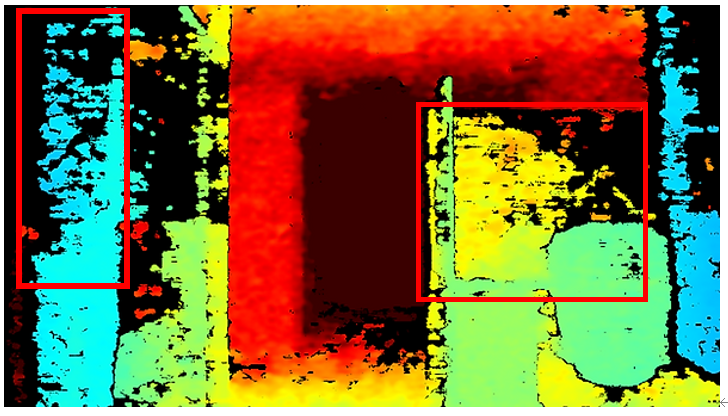
DepthEnhancementwAE430 | LIPS® Developer Documentation

Depth Enhancement with LIPSedge™ AE430

3. Get the best distance, which the readout is defined by its accuracy #

4. Obtaining a good result from the 3D Point Cloud #

Which criteria are used to judge a Point cloud ?

Coloring & Texture #

Looking at how realistic the coloring and texturing of the point cloud looks versus a high-quality digital camera is a key factor.

The importance: Good coloring and texture help you identify small details in the data set, for instance objects that are in the target vision. This provides high value information while the image is being processed since it would be able to discern the objects properly and accurately.

Noise #

Noisy points usually show up in every raw data set, regardless of the 3D depth camera used, because the physical behavior of the laser components which creates random imperfections in the data.

The importance. Too much noise can cause problems in modeling applications. For instance, if you are modeling a floor, a “line” that is 3 cm thick due to noise can make it difficult to discern where to start a line. Excessive noise also makes a point cloud larger than it needs to be, making it less accurate geometrically.

Details Resolution #

The more details the capture it has, the more accurate and precise the results will be.

The importance. Many computer vision application use-cases rely on such to process and running on learning machine models. The delivered details will assist in reducing the processing time to output the desired actions for the application.

LIPSedge™ AE430 Point Cloud Example #

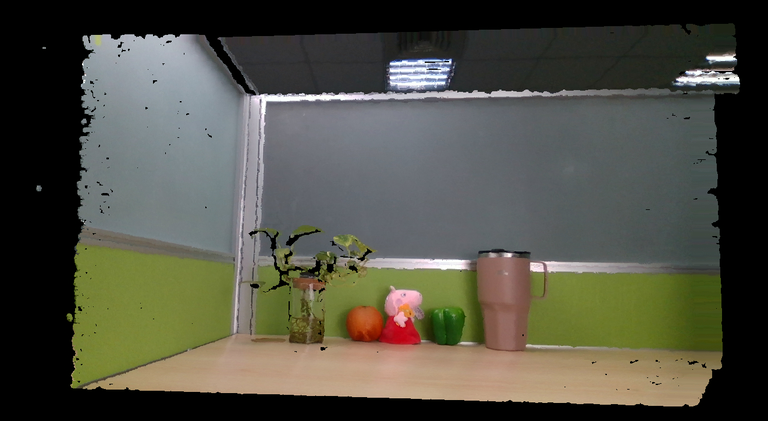
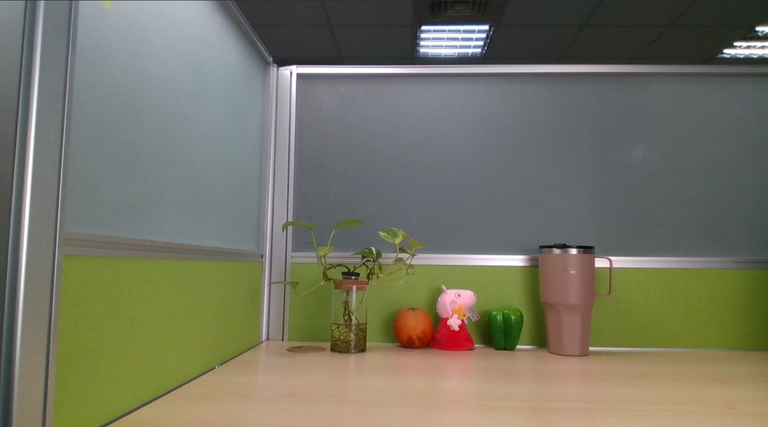
As below, an example from an original capture from the RGB (color sensor) LIPSedge™ AE430 Active Stereo camera at a 110cm distance.

And further captures from the same LIPSedge™ AE430 with its Point Cloud. It can be seen how close and its resemblance the Point Cloud image is compared with its original color RGB image, reflecting a high fidelity result.

LIPSedge™ AE430 RGB image #
AE430RGBImage | LIPS® Developer Documentation

LIPSedge™ AE430 Point Cloud Image #

AE430PointCloud | LIPS® Developer Documentation

LIPSedge™ AE430 Point Cloud Image #

When moving the 3D Point Cloud to a different angle
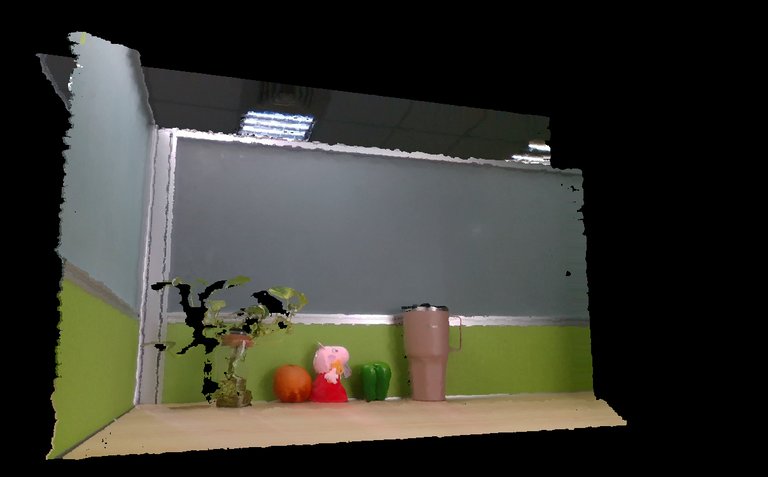
AE430PointCloudDiffAngle | LIPS® Developer Documentation

LIPSedge™ AE430 Point Cloud Image #

When moving the 3D Point Cloud to a different angle
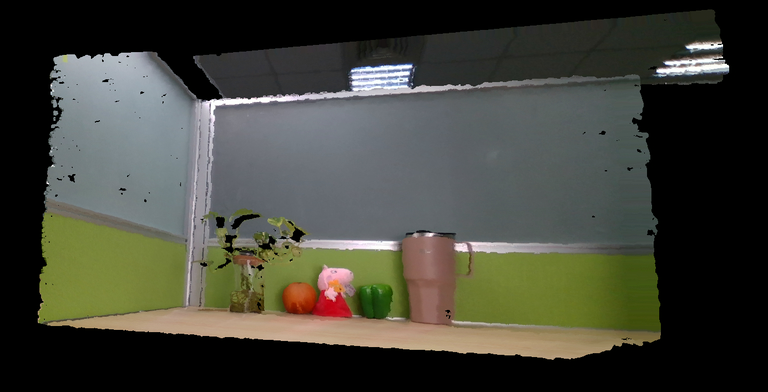
AE430PointCloudDiffAngle2 | LIPS® Developer Documentation

Updated on 2025 年 8 月 28 日
Depth Image Basics

Understanding DepthLIPSedge™ AE Series Camera Selection Guide
Table of Contents
  • 1. See what is required under its ambient conditions
  • 2. See with little noise, which affect the precision of what is being seen
  • 3. Get the best distance, which the readout is defined by its accuracy
  • 4. Obtaining a good result from the 3D Point Cloud
    • Coloring & Texture
    • Noise
    • Details Resolution
  • LIPSedge™ AE430 Point Cloud Example
    • LIPSedge™ AE430 RGB image
    • LIPSedge™ AE430 Point Cloud Image
    • LIPSedge™ AE430 Point Cloud Image
    • LIPSedge™ AE430 Point Cloud Image

#LIPS

About Us

Store

Blog

Terms of Use

DEVELOPER

Technical Support

SDK Download

Code Samples

Github

Copyright © 2026 LIPS Corporation | Privacy Policy | Cookie Policy | Do Not Sell My Personal Information