
Overview #
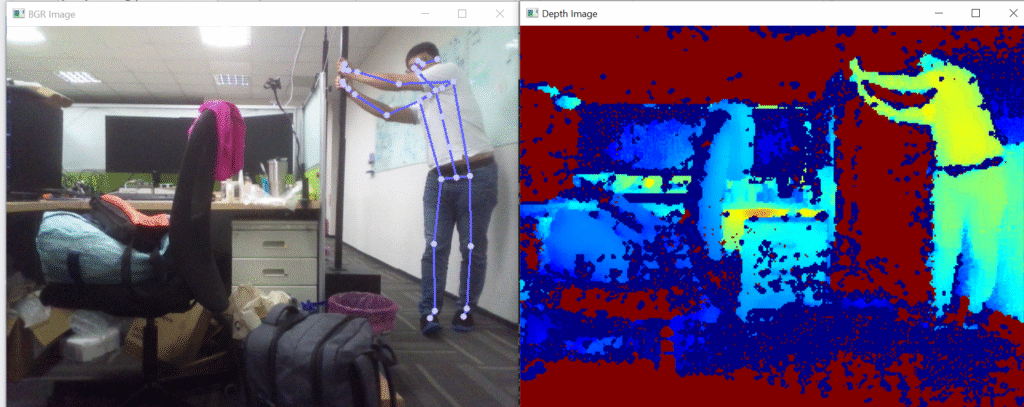
The Skeleton Example (OpenCV) program demonstrates the results that LIPSense 3D Body Pose SDK working with OpenCV.
Tutorial #
1. Include header files to access the functions they provide.
#include <LIPSBodyPose.h>
#include <iostream>
#include <opencv2/opencv.hpp>
2. Create a drawSkeleton function which contains the following part:
void drawSkeletons( cv::Mat& img, std::vector<lips::Skeleton>& skeletons )
{
    const std::vector<std::array<enum lips::Skeleton::Part, 2>> connection_pairs =  //1
    {
        // Face
        { lips::Skeleton::R_EYE, lips::Skeleton::R_EAR },
        { lips::Skeleton::L_EYE, lips::Skeleton::L_EAR },
        { lips::Skeleton::R_EYE, lips::Skeleton::NOSE },
        { lips::Skeleton::L_EYE, lips::Skeleton::NOSE },
        { lips::Skeleton::R_EYE, lips::Skeleton::HEAD },
        { lips::Skeleton::L_EYE, lips::Skeleton::HEAD },
        // Body
        { lips::Skeleton::NOSE, lips::Skeleton::NECK },
        { lips::Skeleton::NECK, lips::Skeleton::R_CLAVICLE },
        { lips::Skeleton::R_CLAVICLE, lips::Skeleton::R_SHOULDER },
        { lips::Skeleton::NECK, lips::Skeleton::L_CLAVICLE },
        { lips::Skeleton::L_CLAVICLE, lips::Skeleton::L_SHOULDER },
        { lips::Skeleton::R_SHOULDER, lips::Skeleton::R_HIP },
        { lips::Skeleton::L_SHOULDER, lips::Skeleton::L_HIP },
        { lips::Skeleton::L_HIP, lips::Skeleton::PELVIS },
        { lips::Skeleton::PELVIS, lips::Skeleton::R_HIP },
        { lips::Skeleton::NECK, lips::Skeleton::CHEST_SPINE },
        { lips::Skeleton::CHEST_SPINE, lips::Skeleton::NAVEL_SPINE },
        { lips::Skeleton::NAVEL_SPINE, lips::Skeleton::PELVIS },

        // Right arm
        { lips::Skeleton::R_SHOULDER, lips::Skeleton::R_ELBOW },
        { lips::Skeleton::R_ELBOW, lips::Skeleton::R_WRIST },
        { lips::Skeleton::R_WRIST, lips::Skeleton::R_HAND },
        { lips::Skeleton::R_HAND, lips::Skeleton::R_THUMB_TIP },
        { lips::Skeleton::R_HAND, lips::Skeleton::R_HAND_TIP },
        // Left arm
        { lips::Skeleton::L_SHOULDER, lips::Skeleton::L_ELBOW },
        { lips::Skeleton::L_ELBOW, lips::Skeleton::L_WRIST },
        { lips::Skeleton::L_WRIST, lips::Skeleton::L_HAND },
        { lips::Skeleton::L_HAND, lips::Skeleton::L_THUMB_TIP },
        { lips::Skeleton::L_HAND, lips::Skeleton::L_HAND_TIP },
        // Right leg
        { lips::Skeleton::R_HIP, lips::Skeleton::R_KNEE },
        { lips::Skeleton::R_KNEE, lips::Skeleton::R_ANKLE },
        { lips::Skeleton::R_ANKLE, lips::Skeleton::R_FOOT },
        // Left leg
        { lips::Skeleton::L_HIP, lips::Skeleton::L_KNEE },
        { lips::Skeleton::L_KNEE, lips::Skeleton::L_ANKLE },
        { lips::Skeleton::L_ANKLE, lips::Skeleton::L_FOOT }
    };

    const std::vector<cv::Scalar> color_list = { cv::Scalar( 255, 100, 100 ),  //2
                                                 cv::Scalar( 255, 255, 100 ),
                                                 cv::Scalar( 100, 255, 100 ),
                                                 cv::Scalar( 100, 255, 255 ),
                                                 cv::Scalar( 100, 100, 255 ) };

    for( auto& skeleton : skeletons )                                           //3
    {
        // Draw connection lines
        const int color_idx = skeleton.id() % color_list.size();
        const cv::Scalar line_color = color_list[color_idx];
        const int line_width = 2;
        for( auto& pair : connection_pairs )
        {
            lips::Keypoint keypoint_a = skeleton[pair[0]];
            lips::Keypoint keypoint_b = skeleton[pair[1]];
            if( keypoint_a.is_valid && keypoint_b.is_valid )
            {
                const cv::Point2f point_a = { keypoint_a.point2d.x, keypoint_a.point2d.y } ;
                const cv::Point2f point_b = { keypoint_b.point2d.x, keypoint_b.point2d.y } ;

                cv::line( img, point_a, point_b, line_color, line_width );
            }
        }

        // Draw keypoints
        const cv::Scalar circle_color( line_color[0] + 100, line_color[1] + 100, line_color[2] + 100 ); //4
        const int circle_radius = 4;
        const int circle_line_width = -1;  // solid
        for( auto& keypoint : skeleton )
        {
            if( keypoint.is_valid )
            {
                cv::circle( img, cv::Point2f{ keypoint.point2d.x, keypoint.point2d.y },
                            circle_radius, circle_color, circle_line_width );
            }
        }
    }
}- 1 Defines the keypoints (joints) that should be connected with lines to form the stick-like skeletal figure. Examples: Face: eye → ear, eye → nose.
- 2 Creates a list of predefined colors (BGR format) to represent each skeleton in a distinct color. Example: Person 1 = red, Person 2 = yellow, etc.
- 3 For every detected person:
Pick a color for their skeleton → Draw lines between valid joint pairs from connection_pairs. → Draw circles at each joint if it is marked as valid. - 4 Circles (filled) are drawn at each keypoint location to highlight joint positions — usually brighter than the line color for higher visibility.
3. Create a colorizeDepthMap function which contains the following part:
cv::Mat colorizeDepthMap( const cv::Mat& depth, const int display_min_z = 300, const int display_max_z = 3000 ) //1
{
    const double normalize_alpha = 255.0 / static_cast<double>( display_max_z - display_min_z );
    const double normalize_beta = static_cast<double>( -255.0 * display_min_z ) /
                                  static_cast<double>( display_max_z - display_min_z );

    cv::Mat output;                                                         //2
    cv::Mat depth_normal;
    depth.convertTo( depth_normal, CV_8UC1, normalize_alpha, normalize_beta );
    cv::applyColorMap( depth_normal, output, cv::COLORMAP_JET );            //3

    return output;
}| Segments | Functions |
|---|---|
| 1 | Normalize depth values within a 8-bit range. Maps depth values from [display_min_z, display_max_z] (e.g., 300–3000 mm) to [0, 255]. |
| 2 | Converts the original 16-bit depth image to 8-bit for color mapping. |
| 3 | Uses OpenCV’s JET colormap to turn grayscale visualization into a colorful one (red-yellow-green-blue). |
4. Create the main function and put on the whole process:
int main()
{
    lips::LIPSBodyPose lipsbodypose;                                       //1

    lipsbodypose.run();                                                     //2

    std::cout << "Press ESC to exit" << std::endl;
    while( true )
    {
        lips::Frame frame;                                                  //3
        lipsbodypose.readFrame( frame );                                    //4
        lips::Image<unsigned char[3]> lips_img_color = frame.color_image_bgr; //5
        lips::Image<unsigned short> lips_img_depth = frame.depth_image_mm;
        std::vector<lips::Skeleton> skeletons = frame.skeletons;

        cv::Mat img_color = cv::Mat( cv::Size( lips_img_color.width(), lips_img_color.height() ), //6
                                     CV_8UC3, reinterpret_cast<void*>( lips_img_color.data() ) );
        cv::Mat img_depth = cv::Mat( cv::Size( lips_img_depth.width(), lips_img_depth.height() ),
                                     CV_16UC1, reinterpret_cast<void*>( lips_img_depth.data() ) );

        drawSkeletons( img_color, skeletons );                              //7

        cv::imshow( "BGR Image", img_color );                               //8
        cv::imshow( "Depth Image", colorizeDepthMap( img_depth ) );

        const char key_input = cv::waitKey( 1 );                            //9
        if( key_input == 27 ) // ESC
            break;
    }

    lipsbodypose.stop();                                                    //10

    return 0;
}| Segments | Functions |
|---|---|
| 1 | Creates an instance of the body pose detection engine. |
| 2 | Starts the body pose engine. |
| 3 | A structure that holds one frame’s value of: RGB image, Depth image, Detected skeletons. |
| 4 | Reads the latest available frame from the LIPS SDK. |
| 5 | Extract image and skeleton data (color_image_bgr, depth_image_mm, skeletons). |
| 6 | Converts LIPS SDK’s custom Image<> type into standard OpenCV image types. |
| 7 | Draw skeletons on top of the image. |
| 8 | Display images in windows. |
| 9 | If the key is ESC (ASCII 27), exit the loop. |
| 10 | Terminates the SDK engine. |
Expected output #
Full code #
#include <LIPSBodyPose.h>
#include <iostream>
#include <opencv2/opencv.hpp>

void drawSkeletons( cv::Mat& img, std::vector<lips::Skeleton>& skeletons )
{
    const std::vector<std::array<enum lips::Skeleton::Part, 2>> connection_pairs =
    {
        // Face
        { lips::Skeleton::R_EYE, lips::Skeleton::R_EAR },
        { lips::Skeleton::L_EYE, lips::Skeleton::L_EAR },
        { lips::Skeleton::R_EYE, lips::Skeleton::NOSE },
        { lips::Skeleton::L_EYE, lips::Skeleton::NOSE },
        { lips::Skeleton::R_EYE, lips::Skeleton::HEAD },
        { lips::Skeleton::L_EYE, lips::Skeleton::HEAD },
        // Body
        { lips::Skeleton::NOSE, lips::Skeleton::NECK },
        { lips::Skeleton::NECK, lips::Skeleton::R_CLAVICLE },
        { lips::Skeleton::R_CLAVICLE, lips::Skeleton::R_SHOULDER },
        { lips::Skeleton::NECK, lips::Skeleton::L_CLAVICLE },
        { lips::Skeleton::L_CLAVICLE, lips::Skeleton::L_SHOULDER },
        { lips::Skeleton::R_SHOULDER, lips::Skeleton::R_HIP },
        { lips::Skeleton::L_SHOULDER, lips::Skeleton::L_HIP },
        { lips::Skeleton::L_HIP, lips::Skeleton::PELVIS },
        { lips::Skeleton::PELVIS, lips::Skeleton::R_HIP },
        { lips::Skeleton::NECK, lips::Skeleton::CHEST_SPINE },
        { lips::Skeleton::CHEST_SPINE, lips::Skeleton::NAVEL_SPINE },
        { lips::Skeleton::NAVEL_SPINE, lips::Skeleton::PELVIS },

        // Right arm
        { lips::Skeleton::R_SHOULDER, lips::Skeleton::R_ELBOW },
        { lips::Skeleton::R_ELBOW, lips::Skeleton::R_WRIST },
        { lips::Skeleton::R_WRIST, lips::Skeleton::R_HAND },
        { lips::Skeleton::R_HAND, lips::Skeleton::R_THUMB_TIP },
        { lips::Skeleton::R_HAND, lips::Skeleton::R_HAND_TIP },
        // Left arm
        { lips::Skeleton::L_SHOULDER, lips::Skeleton::L_ELBOW },
        { lips::Skeleton::L_ELBOW, lips::Skeleton::L_WRIST },
        { lips::Skeleton::L_WRIST, lips::Skeleton::L_HAND },
        { lips::Skeleton::L_HAND, lips::Skeleton::L_THUMB_TIP },
        { lips::Skeleton::L_HAND, lips::Skeleton::L_HAND_TIP },
        // Right leg
        { lips::Skeleton::R_HIP, lips::Skeleton::R_KNEE },
        { lips::Skeleton::R_KNEE, lips::Skeleton::R_ANKLE },
        { lips::Skeleton::R_ANKLE, lips::Skeleton::R_FOOT },
        // Left leg
        { lips::Skeleton::L_HIP, lips::Skeleton::L_KNEE },
        { lips::Skeleton::L_KNEE, lips::Skeleton::L_ANKLE },
        { lips::Skeleton::L_ANKLE, lips::Skeleton::L_FOOT }
    };

    const std::vector<cv::Scalar> color_list = { cv::Scalar( 255, 100, 100 ),
                                                 cv::Scalar( 255, 255, 100 ),
                                                 cv::Scalar( 100, 255, 100 ),
                                                 cv::Scalar( 100, 255, 255 ),
                                                 cv::Scalar( 100, 100, 255 ) };

    for( auto& skeleton : skeletons )
    {
        // Draw connection lines
        const int color_idx = skeleton.id() % color_list.size();
        const cv::Scalar line_color = color_list[color_idx];
        const int line_width = 2;
        for( auto& pair : connection_pairs )
        {
            lips::Keypoint keypoint_a = skeleton[pair[0]];
            lips::Keypoint keypoint_b = skeleton[pair[1]];
            if( keypoint_a.is_valid && keypoint_b.is_valid )
            {
                const cv::Point2f point_a = { keypoint_a.point2d.x, keypoint_a.point2d.y } ;
                const cv::Point2f point_b = { keypoint_b.point2d.x, keypoint_b.point2d.y } ;

                cv::line( img, point_a, point_b, line_color, line_width );
            }
        }

        // Draw keypoints
        const cv::Scalar circle_color( line_color[0] + 100, line_color[1] + 100, line_color[2] + 100 );
        const int circle_radius = 4;
        const int circle_line_width = -1;  // solid
        for( auto& keypoint : skeleton )
        {
            if( keypoint.is_valid )
            {
                cv::circle( img, cv::Point2f{ keypoint.point2d.x, keypoint.point2d.y },
                            circle_radius, circle_color, circle_line_width );
            }
        }
    }
}

cv::Mat colorizeDepthMap( const cv::Mat& depth, const int display_min_z = 300, const int display_max_z = 3000 )
{
    const double normalize_alpha = 255.0 / static_cast<double>( display_max_z - display_min_z );
    const double normalize_beta = static_cast<double>( -255.0 * display_min_z ) /
                                  static_cast<double>( display_max_z - display_min_z );

    cv::Mat output;
    cv::Mat depth_normal;
    depth.convertTo( depth_normal, CV_8UC1, normalize_alpha, normalize_beta );
    cv::applyColorMap( depth_normal, output, cv::COLORMAP_JET );

    return output;
}

int main()
{
    lips::LIPSBodyPose lipsbodypose;

    lipsbodypose.run();

    std::cout << "Press ESC to exit" << std::endl;
    while( true )
    {
        lips::Frame frame;
        lipsbodypose.readFrame( frame );
        lips::Image<unsigned char[3]> lips_img_color = frame.color_image_bgr;
        lips::Image<unsigned short> lips_img_depth = frame.depth_image_mm;
        std::vector<lips::Skeleton> skeletons = frame.skeletons;

        cv::Mat img_color = cv::Mat( cv::Size( lips_img_color.width(), lips_img_color.height() ),
                                     CV_8UC3, reinterpret_cast<void*>( lips_img_color.data() ) );
        cv::Mat img_depth = cv::Mat( cv::Size( lips_img_depth.width(), lips_img_depth.height() ),
                                     CV_16UC1, reinterpret_cast<void*>( lips_img_depth.data() ) );

        drawSkeletons( img_color, skeletons );

        cv::imshow( "BGR Image", img_color );
        cv::imshow( "Depth Image", colorizeDepthMap( img_depth ) );

        const char key_input = cv::waitKey( 1 );
        if( key_input == 27 ) // ESC
            break;
    }

    lipsbodypose.stop();

    return 0;
}