
Overview #
Controlling camera sensor parameters.
Expected Output #

Prerequisite #
Tutorial #
C++
cout << "Detected devices:" << endl;
    for (int i = 0; i < deviceList.getSize(); ++i) {
        const DeviceInfo& info = deviceList[i];
        cout << " [" << i << "] Name:   " << info.getName() << endl;
        cout << "      Vendor: " << info.getVendor() << endl;
        cout << "      URI:    " << info.getUri() << endl;
}- Index number
- Device name
- Vendor name
- URI (used later to open the specific device)
C++
  cout << "Please enter the index of the device to open (0 ~ "
        << deviceList.getSize() - 1 << "): ";
    int devIndex = 0;
    cin >> devIndex;
    if (devIndex < 0 || devIndex >= deviceList.getSize()) {
        cerr << "Device index out of range." << endl;
        OpenNI::shutdown();
        return 1;
    }

    // ------------- Open selected device -------------
    Device device;
    if (device.open(deviceList[devIndex].getUri()) != STATUS_OK) {
        cerr << "Failed to open device: "
            << OpenNI::getExtendedError() << endl;
        OpenNI::shutdown();
        return 1;
}- The user chooses which device to use by entering an index.
- The program opens the selected device using its URI.
- If the open operation fails, the program exits and prints the OpenNI error message.
C++
    struct SensorEntry {
        SensorType type;
        string name;
        const SensorInfo* info;
    };

    vector<SensorEntry> sensors;

    const SensorInfo* colorInfo = device.getSensorInfo(SENSOR_COLOR);
    if (colorInfo) {
        sensors.push_back({ SENSOR_COLOR, "Color", colorInfo });
    }

    const SensorInfo* depthInfo = device.getSensorInfo(SENSOR_DEPTH);
    if (depthInfo) {
        sensors.push_back({ SENSOR_DEPTH, "Depth", depthInfo });
    }

    const SensorInfo* irInfo = device.getSensorInfo(SENSOR_IR);
    if (irInfo) {
        sensors.push_back({ SENSOR_IR, "IR", irInfo });
}Probes the device for different sensor types:
- SENSOR_COLOR
- SENSOR_DEPTH
- SENSOR_IR
For each existing sensor, a SensorEntry is added to a vector, storing:
- The sensor type (SensorType)
- A human-readable name
- A pointer to SensorInfo, which includes supported video modes and other metadata.
C++
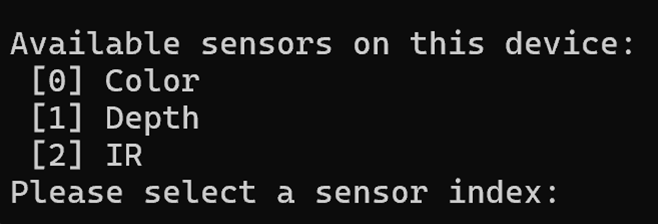
   cout << "\nAvailable sensors on this device:" << endl;
    for (size_t i = 0; i < sensors.size(); ++i) {
        cout << " [" << i << "] " << sensors[i].name << endl;
    }

    cout << "Please select a sensor index: ";
    int sensorIndex = 0;
    cin >> sensorIndex;
    SensorType chosenType = sensors[sensorIndex].type;
const SensorInfo* chosenInfo = sensors[sensorIndex].info;- Lists the available sensors (e.g., Color, Depth, IR) to the user.
- The user chooses which sensor to work with.
- Stores the selected sensor type and its SensorInfo for subsequent steps.
C++
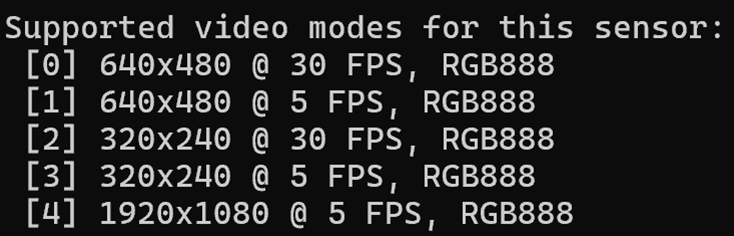
const Array<VideoMode>& modes = chosenInfo->getSupportedVideoModes();
int modeIndex = 0;
cin >> modeIndex;
VideoMode selectedMode = modes[modeIndex];- Retrieves all supported VideoMode entries for the chosen sensor.
- Each video mode contains:Resolution (X, Y)、FPS、Pixel format
- The user chooses which video mode to use.
- The selected mode is then applied to the stream before starting it.